Features

Vangrd feature list: every automation and its setup guide

Vangrd automates building, farm lists, troop training, defense, settling new villages, and resource logistics with market trades. Runs 24/7 on Vangrd cloud servers with nothing to install. Choose your settings and inspect each workflow through the web dashboard.

Travian bot for full-account automation ยท how the cloud Travian bot works

Alliance and coalition management

Alliance Command gives your group shared planning tools, with or without agents.

  • Share incoming attacks, troops, resources, and reports by paste or form.
  • Coordinate defence calls, commitments, and operation assignments.
  • Connect alliances in a coalition with chosen sharing permissions.
  • Use a shared map, settlement claims, and enemy dossiers.
  • Route alerts and decision cards through Discord and Telegram.
Explore Alliance Command

Automation with configuration guides

Use the guide for each feature to see its settings, prerequisites, and current interface. You decide which automation runs.

Vangrd feature matrix and configuration guides
CapabilityWhat you can configure
Farming and oasis clearingRun farm lists, review losses, and tune raids with the optimizer.
Construction and templatesSet building targets and reusable plans across villages.
Troop training and healingChoose troop priorities, resource thresholds, and healing settings.
SettlementPrepare settlers and send them to coordinates you choose.
Incoming attack responseMonitor incoming attacks and apply per-village response rules.
Attack planningPlan waves by send time or arrival time and inspect execution status.
Resource logisticsConnect donor villages, preserve reserves, and fund destination needs.
Market purchasesConfigure resource purchases and market limits.
Account schedulesSet active periods and manage shared-account access.
Custom workflowsCombine triggers, conditions, actions, and delays.
Player trackingScan player profiles and compare changes over time.

Four complete automation workflows

These sequences show how configured actions depend on village state. Screenshots show the controls; they are not records of live results.

From settler preparation to a new village

You choose the source village, target coordinates, settler count, and whether automatic dispatch is enabled.

  1. Check culture points, troops, and resources
  2. Prepare the Residence and train settlers when enabled
  3. Check the chosen tile and available settlement slot
  4. Send settlers and check settlement progress

An occupied tile or missing settlement slot blocks dispatch. Vangrd does not choose your strategic target.

Open the configuration guide
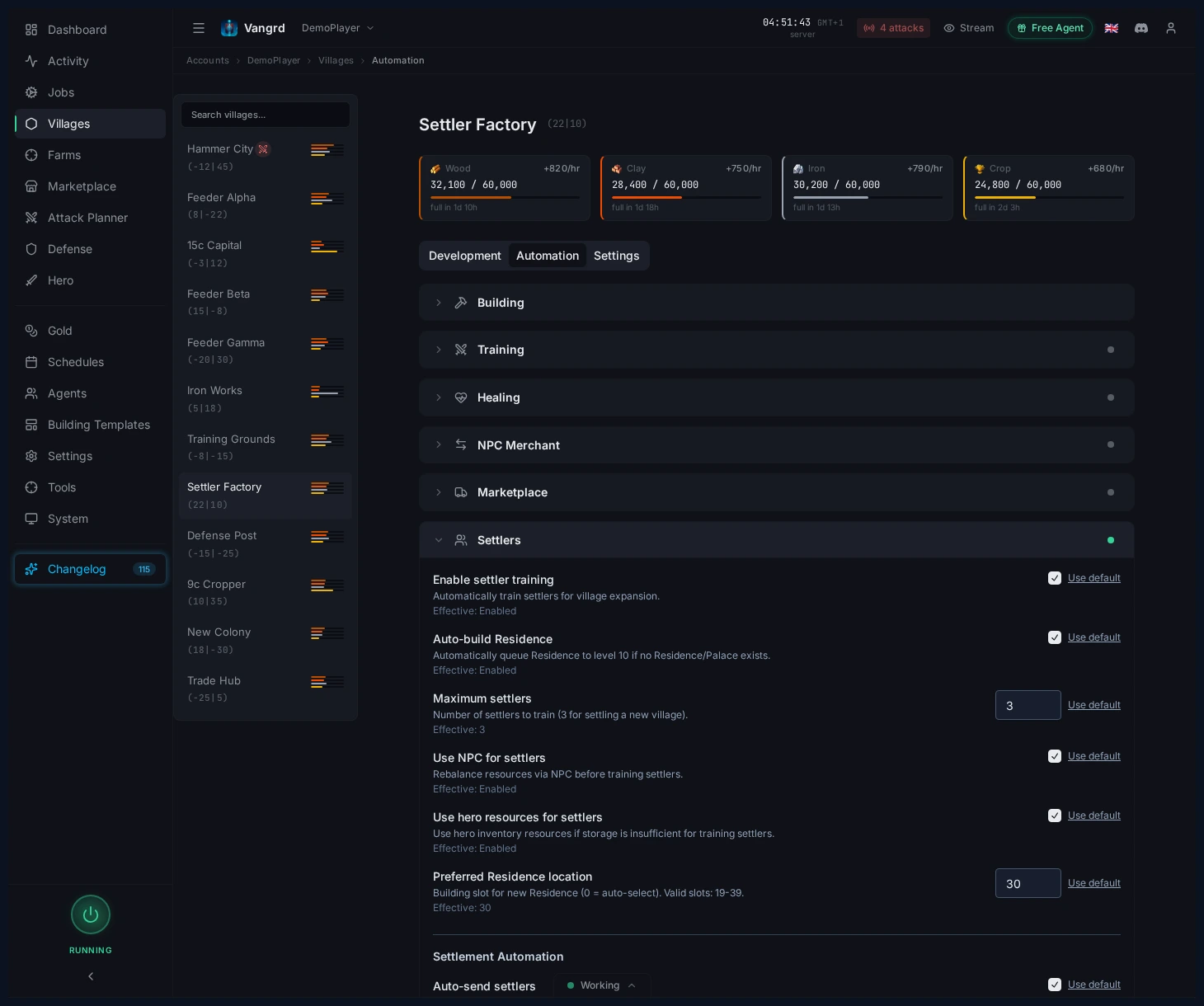
Settler controls with Residence support and target coordinates

From an incoming attack to a configured response

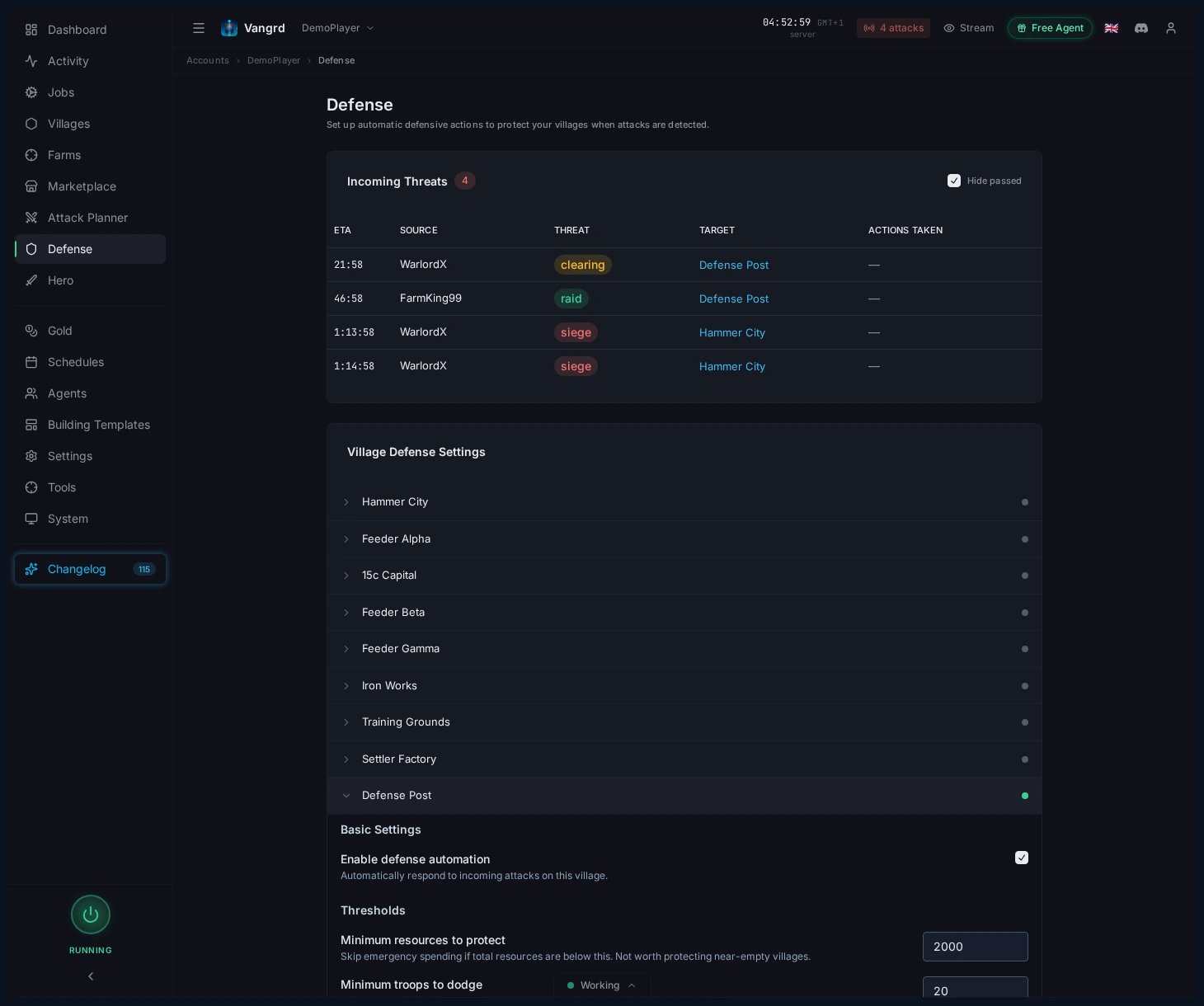
You set village thresholds, threat responses, and notification destinations.

  1. Scan incoming attacks and record observation time
  2. Classify the threat from available information
  3. Apply the village rule and prepare the response
  4. Run the timed response and report its state

Classification is an estimate. Detection and response need a working game session and enough time before the attack.

Open the configuration guide
Village defense rules with thresholds and response settings

From donor reserves to destination funding

You connect source and destination villages, choose funding triggers, and set reserves and shipment limits.

  1. Check destination needs and resources in transit
  2. Rank donors and subtract their keep reserves
  3. Check merchants, minimum shipment, and fleet limits
  4. Send resources and update shipment state

Several donors can contribute. Resources or merchants already in transit can delay the next shipment.

Open the configuration guide
Funding link controls with donor reserves and shipment limits

From village priorities to building and troop queues

You set a build plan, troop priorities, training thresholds, and permission for optional resource helpers.

  1. Refresh resources and read existing queues
  2. Check building prerequisites and queue capacity
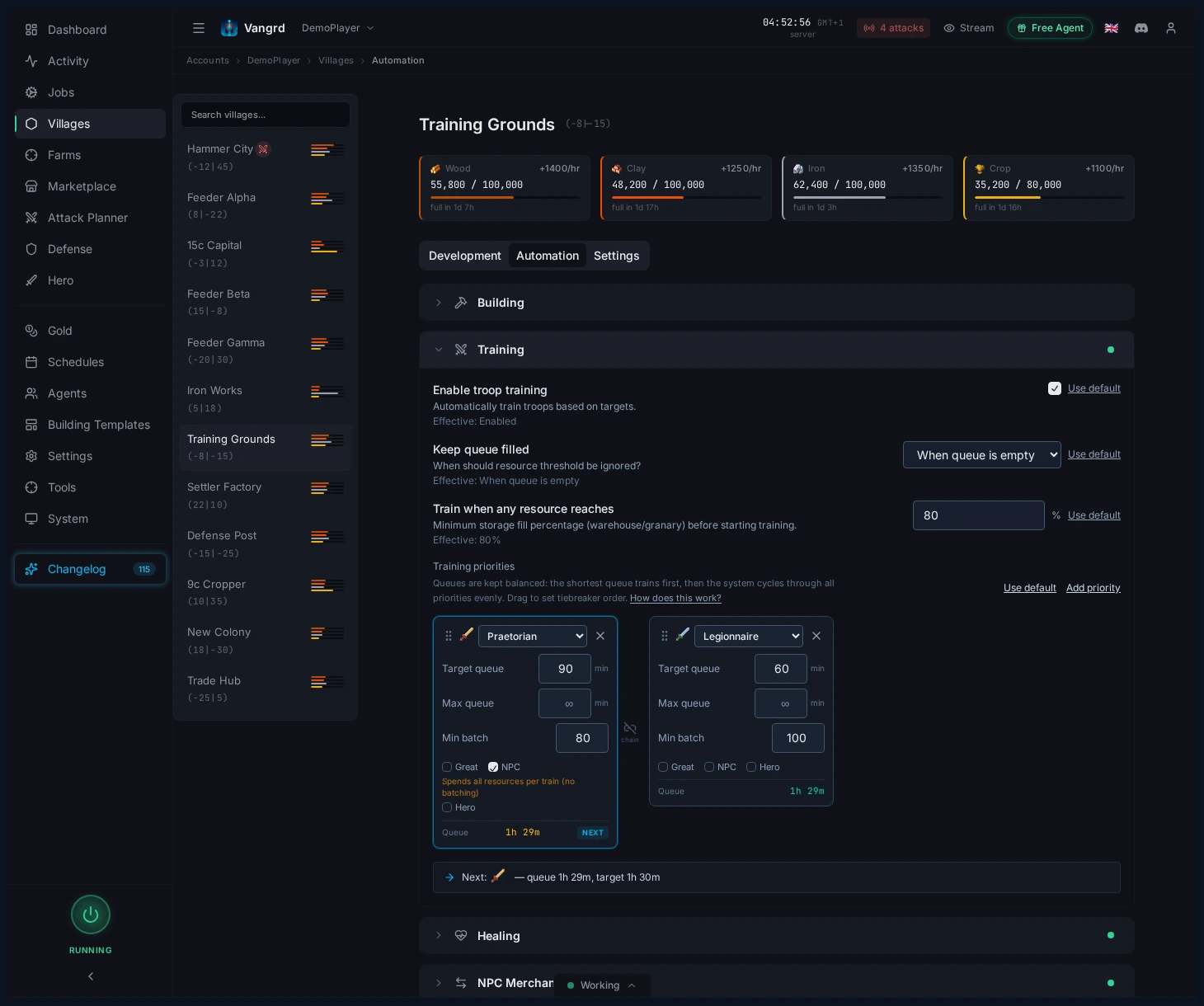
  3. Evaluate troop priorities, healing, and optional overflow training
  4. Run eligible work and show waits for resources or space

Building and training share village resources. Your thresholds and priorities control demand; a blocked village need not hold other village chains.

Open the configuration guideBuilding plans and templates
Village troop training priorities and resource controls
How Vangrd recovers interrupted work

Automation

What Vangrd Automates

Village Automation

Keeps build queues moving across every village. Plans react when a slot opens, and templates cover builds, smithy research, parties, and demolition.

Farm Lists

Runs farm lists on a schedule with jitter, stops dead targets automatically, and supports probe raids, oasis clearing, and troop tuning.

Attack Alerts & Defense

Watches incomings, labels likely threats, and can dodge, spend down resources, or recall troops. Discord alerts are built in.

Timed Sends

Set up attack waves by send or arrival time. Check execution status and timing failures.

Troop Training

Trains by priority, handles NPC when needed, swaps the hero helmet, recruits settlers, and heals troops automatically.

Resources & Shipping

Keeps resources balanced with NPC trades, feeder shipments, and automatic reward claiming.

Details

Everything in the App

Account Management

  • Multi-account support. one dashboard for multiple Travian accounts, each with its own settings and automation
  • Agent support. give each agent (dual, sitter, or owner) its own schedule, dedicated connection, browser profile, and label
  • Connection management. buy or assign a dedicated connection in the app and monitor connection health
  • Work/sleep scheduling. weekly availability grids with presets like 24/7, work hours, night shift, or weekends
  • Discord notifications. attack alerts and defense notices over Discord webhooks
  • Data export & import. export accounts, settings, and browser profiles to JSON, then restore with merge or replace options

Village Development

  • Building automation. run build plans step by step and fill queue openings as soon as they appear
  • Build plan templates. save reusable plans with an interactive village map, tribe-aware building choices, and bulk field actions
  • Smithy research. queue weapon and armor upgrades and process them in order
  • Building demolition. queue demolitions or right-click a building in the village center to add it fast
  • Celebration automation. start celebrations in eligible villages as soon as resources allow
  • NPC resource rebalancing. rebalance with NPC when storage is about to overflow or crop gets tight
  • Resource supply chains. ship surplus resources from feeder villages while respecting keep thresholds
  • Market offers. accept offers from other players when what comes in is worth more to that village than what goes out

Troop Training

  • Automated training. per-village priority queues that train as soon as resources cross your threshold
  • Minimum batch sizes. skip tiny batches so small surpluses are not wasted
  • Crop reserve protection. keep a configurable crop buffer so troops do not starve
  • Hero resource awareness. optionally count hero-produced resources in affordability checks
  • Training helmet. auto-equip the hero training helmet before queueing troops
  • Troop healing. heal wounded troops in the hospital with configurable priority and resource support

Hero

  • Hero inventory. quick view of hero resource items with manual refresh
  • Auto-start adventures. start adventures when the hero is free and above your health threshold
  • Adventure bonuses. claim bonuses for shorter adventures or higher danger and more XP

Settler & Expansion

  • Automatic settler training. train settlers automatically and optionally build the residence first
  • Auto-settle. send settlers to found a new village as soon as the requirement is met
  • NPC & hero resource support. optionally factor in NPC rebalancing and hero storage for affordability

Farming

  • Farm list execution. run one list or all of them on a schedule with varied delays
  • Oasis clearing. clear animals before oasis farming using a configurable wave strategy
  • Nearby village discovery. scan around your villages, filter targets, and add them to lists from the results
  • Probe raids. send scouts, read reports automatically, and auto-add green targets to a farm list
  • Farm list optimizer. measure yield per wave, turn off weak targets, and tune troop counts for better profit
  • Performance tracking. view snapshots over time with total booty, total raids, and active slots
  • Oasis farming panel. manage oasis targets, track animal regeneration, and watch clearing progress
  • Auto-disable on casualties. disable farm slots after casualties, with separate rules for villages and oases

Defense

  • Incoming attack detection. watch all villages and raise alerts with countdown timers
  • Threat classification. label attacks as raids, clears, sieges, or chiefs using army speed analysis
  • Automated threat response. set per-threat responses like emergency spending, dodging, or troop recalls
  • Per-village defense settings. set defense responses and troop positioning rules for each village

Attack Planning

  • Coordinated attacks. plan targets, troop mixes, wave order, and send times

Player Intelligence

  • Player tracking. watch any player and record population, hero gear, alliance moves, and inactivity
  • Village change detection. spot when nearby players found, lose, or change villages with before-and-after comparisons
  • Inactivity analysis. estimate inactivity from days without movement and population trends

Calculator Tools

  • Travel calculator. calculate distance and travel time with troop type, Tournament Square, artefacts, and server speed
  • Counter attack planner. time interceptions against returning attackers with live countdowns
  • Army calculator. compare effective army power and whether upgrades or new troops are the better spend

Quest & Bonus Automation

  • Quest reward collection. collect Quest Master rewards and Daily Quest chests automatically
  • Ad-watched bonuses. watch the ad for you and claim shorter adventures, harder adventures for more XP, +15% production, or -25% building time

Scanning & Data Freshness

  • Periodic village refresh. revisit village pages on a schedule so cached data stays accurate
  • Storage refresh. refresh warehouse and granary data when it goes stale
  • Troop summary refresh. refresh troop counts so training and farming calculations stay current
  • Combat bonus scanning. scan alliance bonuses and smithy levels daily for current damage numbers

Anti-Detection

  • Random navigation. visit ordinary pages occasionally instead of repeating one path
  • Randomized delays & jitter. use configurable minimum delays and jitter so timings do not look mechanical
  • Work/sleep cycles. go offline during sleep windows and come back during work windows
  • Unique browser fingerprints. each agent gets its own browser profile and can connect through its own dedicated connection

Gold & Premium

  • NPC trade controls. decide whether NPC trades may spend gold and cap uses per hour
  • Per-village overrides. override gold spending per village or inherit the account default

Browser & Session

  • Live browser screencast. watch your agent's cloud browser live through the dashboard screencast
  • Session health monitoring. get warned as soon as the browser session hits trouble

Scheduling & Jobs

  • Job dashboard. see status, last run, next run countdown, and errors at a glance
  • Manual controls. pause, resume, run now, stop a job, or force-tick the scheduler
  • Scheduler panel. live view of active tasks, upcoming runs, blocked jobs, and recent activity
  • Activity log. event history with filters, date grouping, and JSON or CSV export

Scheduled Tasks

  • One-time tasks. create tasks for a specific date and time, with optional preconditions
  • Recurring tasks. set up daily recurring tasks with time-of-day and timezone controls

Messages

  • Auto-read message log. open in-game messages during normal operation and keep a log in the app

Ready to automate?

Connect your account and choose what to automate.