Travian Farm Bot: Automate Farm Lists and Raids
Vangrd automates Travian farm lists with village timing, list overrides, and loss handling. Use the cloud farm bot that keeps raiding while your PC is off.
Group farm lists by village
The Farm Lists panel groups lists by their home village. Each village row shows its timing and list count.
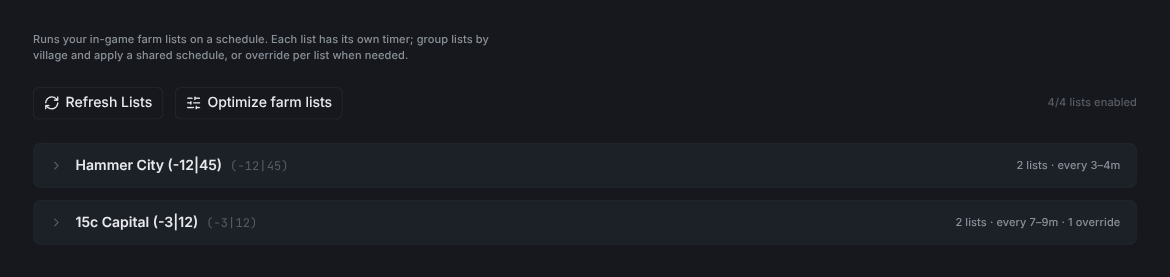
Refresh Listsre-reads your farm lists from the game.Optimize farm listsopens the optimizer.- The counter on the right shows how many lists are enabled.
Apply one schedule to every list in a village
Expand a village to set its schedule. Use Apply to village to set it on every enabled list at once.
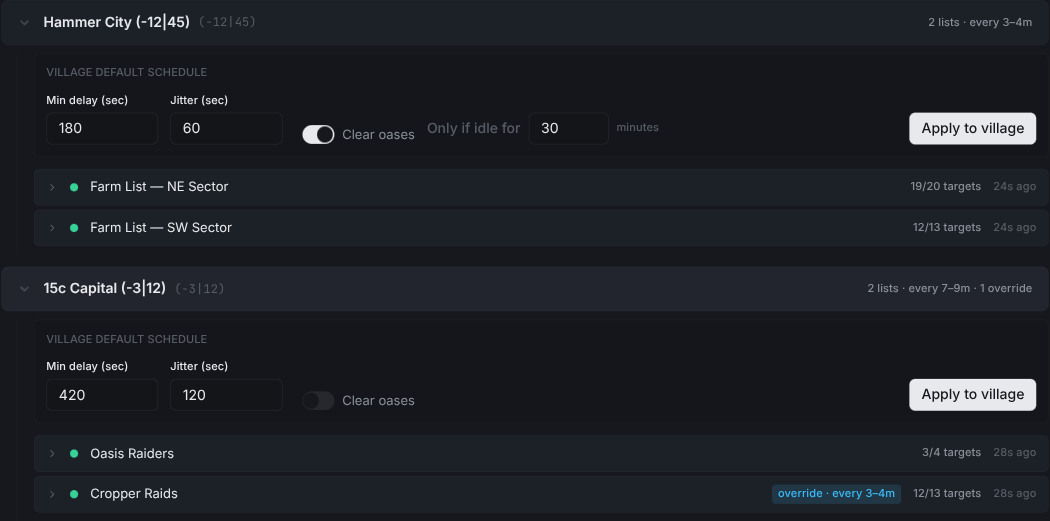
Min delay (sec)is the shortest gap between runs.Jitter (sec)adds randomness so raids don't fire at exact intervals.Clear oasesturns on auto-clearing before each run.Only if idle forskips oases you just cleared.Apply to villagesets this schedule on every enabled list. If any list has its own schedule, a dialog asks first before replacing it.
Tip: Set the village schedule first. Then override only the lists that need something different.
Override the schedule for a single list
Expand a list to give it its own schedule and actions.
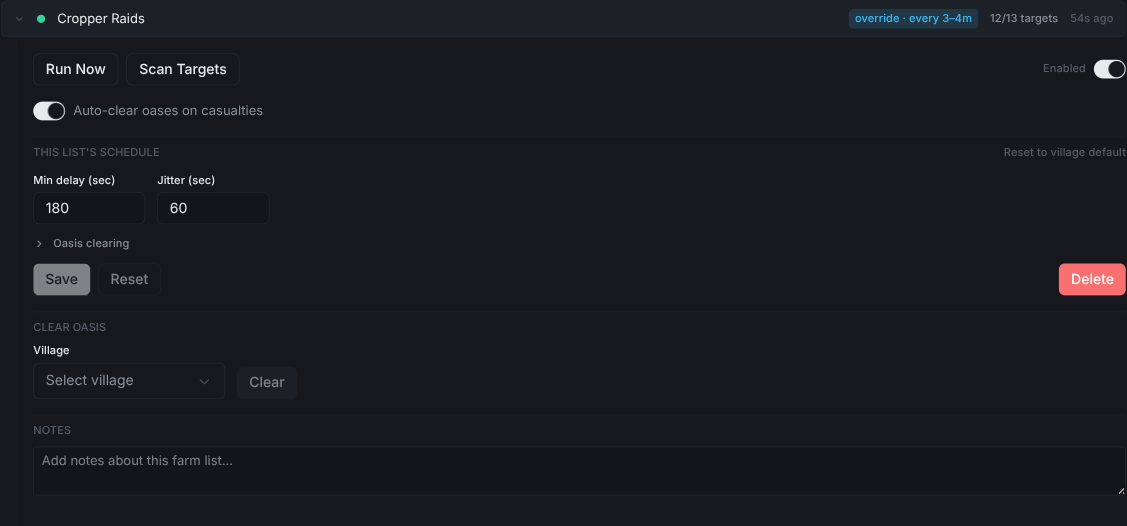
Run Nowfires the list right away.Scan Targetsre-reads targets from the game.Auto-clear oases on casualtiesclears an oasis again after a fatal report.- Edit
Min delayandJitterto override the village schedule. A blueoverride · every Nmtag appears on the collapsed row. Reset to village defaultremoves the override.Deleteremoves the list's schedule.
How the farm bot decides when to send
Min delay sets the shortest gap between runs. Jitter adds a random delay on top.
- Set both values in seconds on the village row or an expanded list.
- Start with village timing, then change only the lists that need a different gap.
- Lists with the same timing can run together. Different timing keeps a list in a separate group.
- Check the override tag before changing a village's timing.
A shorter gap sends more often, but each target also ties up troops during the return trip. Use the optimizer to check whether your troops can cover the selected targets.
Handle losses and fatal reports
With report analysis enabled, Vangrd reads casualty and fatal reports and applies your target-disable rules.
- Set the account's loss policy to choose when Vangrd disables a target.
- Turn on
Auto-clear oases on casualtiesfor lists that should request another clearing attack after losses. - Leave the list setting unset to use the account default.
- Configure the clearing troops before you enable automatic clearing.
The casualty setting applies to oases. A fatal report from a player village does not request an oasis clearing attack. Review the target and your troop allocation before you resume raids after losses.
Tune lists with the optimizer
The optimizer ranks targets by yield per troop within each village's troop budget. Auto-tune adjusts troop counts, while auto-optimize selects targets. Use the Farm Optimizer guide to preview changes before you apply them.
Oasis farming
Oasis clearing, animal respawns, and hero training have their own setup. Follow the Travian oasis farming guide for those settings.
New to Vangrd? Start with the Getting Started guide.
Frequently asked questions
How does Vangrd decide when to send each farm list?
Each list runs on its own schedule. Min delay is the shortest gap between runs. Jitter adds randomness so raids don't fire at exact intervals.
What does the blue override chip on a list mean?
The list runs on a schedule different from the rest of the village. Expand the row to edit its Min delay and Jitter, or click Reset to village default to drop the override.
What happens after a fatal report?
Vangrd reads the report. If Auto-clear oases on casualties is on, it clears the oasis before raids start again. Leave it unset to use the account default.
Vangrd is a Travian bot that runs your account from the cloud, 24/7. Before you choose, see the best Travian bot 2026 comparison.
More guides
Travian Oasis Farming: Clearing, Raiding, and Hero XP
Set up Travian oasis farming end to end: scan nearby oases, clear the animals safely, raid the respawns on a schedule, and level your hero on them.
Travian Farm List Optimizer: Maximize Yield Per Wave
Turn on auto-optimize and auto-tune per list, set cadence, and preview exact changes before they apply, all in one panel.
Travian Defense Bot: Auto-Dodge, Reinforcements, and Attack Alerts
Set Travian defense per village and threat level: auto-dodge, call reinforcements, spend or ship resources, and get Discord or Telegram alerts.