Travian Oasis Farming: Clearing, Raiding, and Hero XP
What oasis farming gets you
Wild animals guard every unoccupied oasis. Clear them and the tile turns into a farm target with no walls, no returning defenders, and no player to retaliate. The animals come back over time, so the same tile pays out again.
- Cleared oases are repeating targets, not one-off loot.
- The animals carry hero experience, so the same tiles double as a training pool.
An oasis also carries a resource bonus of +25% or +50% for one resource. That bonus goes to whichever village holds the tile, which scan results mark as Occupied. It is a separate mechanic from raiding, and raiding an oasis never gives you its bonus.
Scan the oases around a village
Farms > Oasis Scanning sweeps the map around one village and lists what it finds.
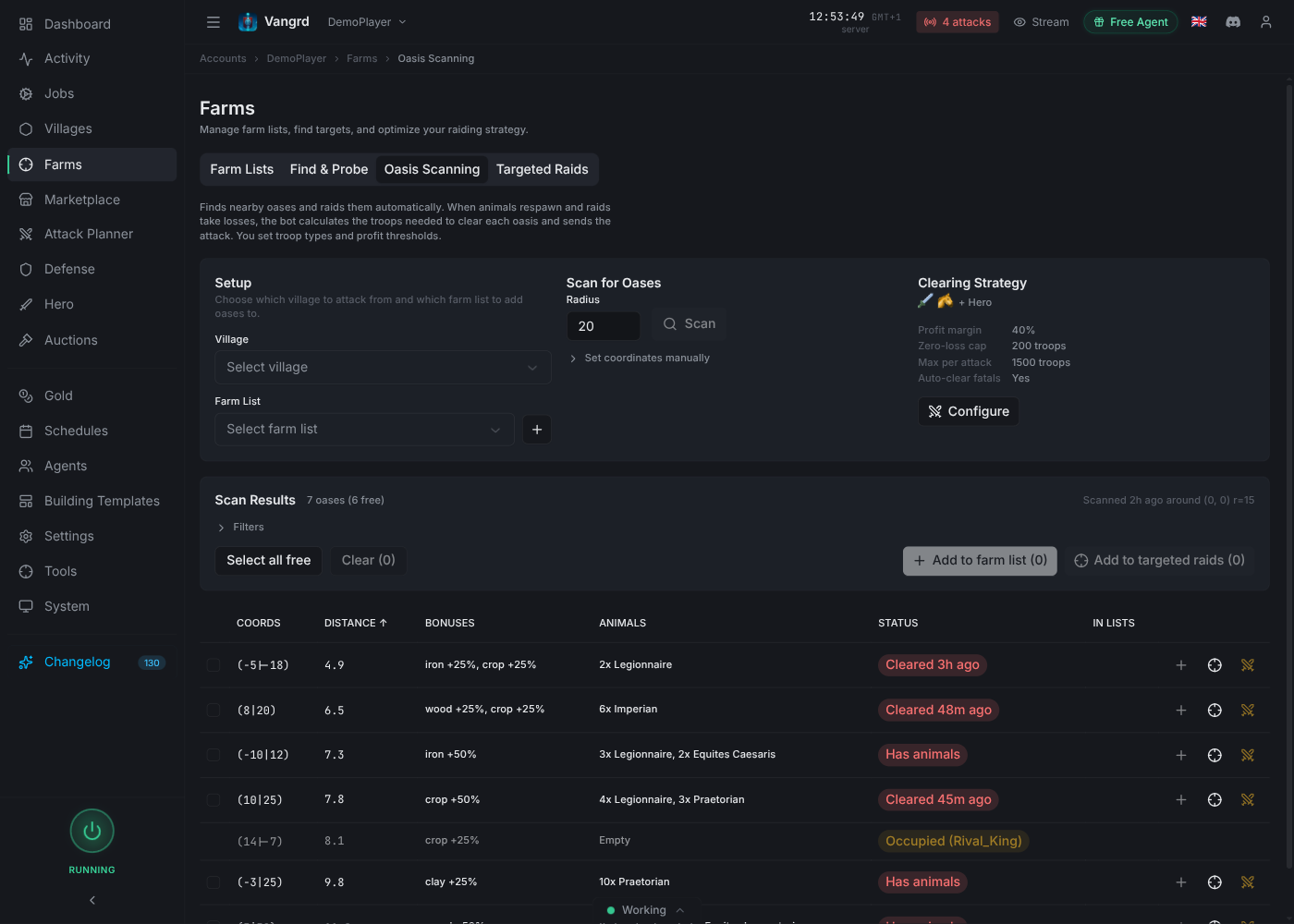
- Under
Setup, pick the village that will attack and the farm list that receives the targets.+creates a list inline. - Set a
Radiusand pressScan.Set coordinates manuallyscans around a point instead of a village. BONUSESis the tile's resource bonus,ANIMALSis what is standing there, andSTATUSsays whether it was cleared recently, still has animals, or belongs to a player.- Open
Filtersto narrow by distance, animal presence, resource type, and bonus size. Hide oases already in farm listsandSkip duplicates when addingstop you from adding the same tile twice.Select all freeticks every unoccupied result. Add them withAdd to farm list, or use+on a single row.
Tip: Scan from the village that will send the raids, because every distance and travel estimate is measured from it.
Clear the animals safely
Configure on the Clearing Strategy card sets how Vangrd clears animals. The settings apply to every list that clears oases.
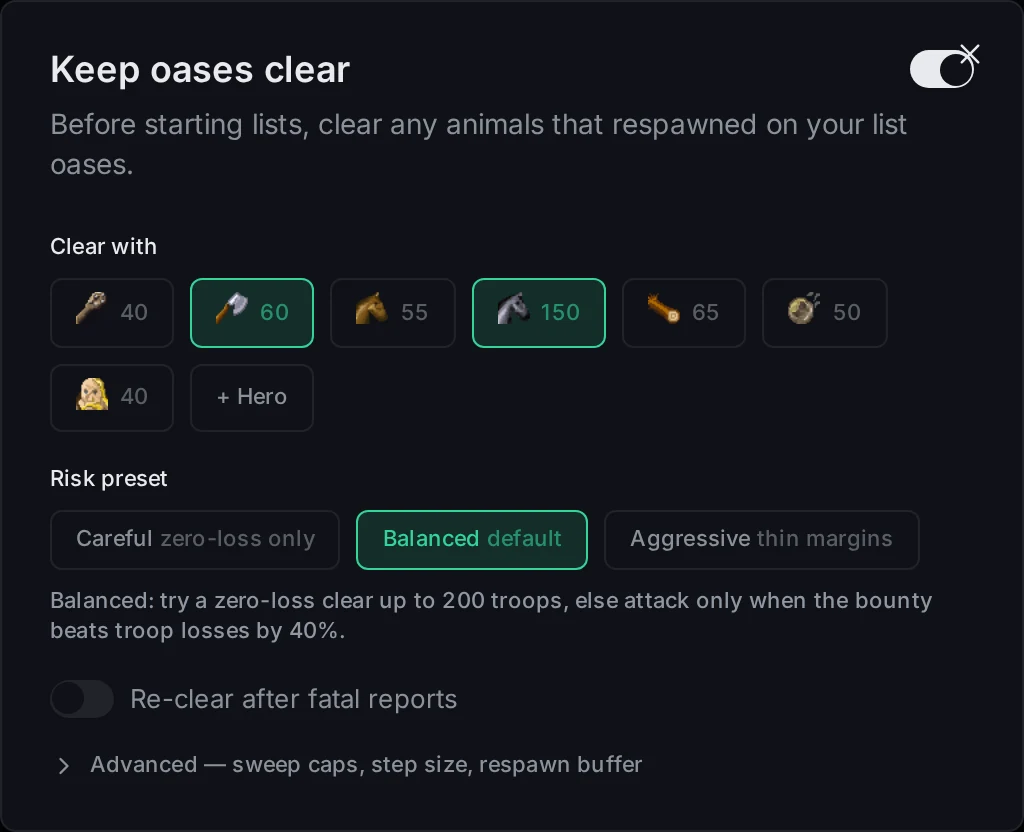
- Pick the units under
Clear with. The number on each chip is what you have available. Add the+ Herochip to send the hero along. Carefulonly attacks when it wins without losses.Balancedtries a zero-loss clear first, then attacks only when the bounty beats the troop losses by the margin.Aggressiveaccepts thin margins.- The sentence under the presets spells out the current numbers, so read it before you close the modal.
Advancedexposes the sweep caps, step size, minimum profit margin, and the defense buffer per travel hour. That buffer pads the estimate for animals respawning while your troops are in the air.- Editing anything under
Advancedswitches the preset toCustom.
To clear a single tile by hand instead, use Clear animals on its row in the scan results.
Keep them clear
Animals refill a cleared oasis, and a fatal report is usually how you find out. Turn clearing on per village or per list under Farms > Farm Lists.
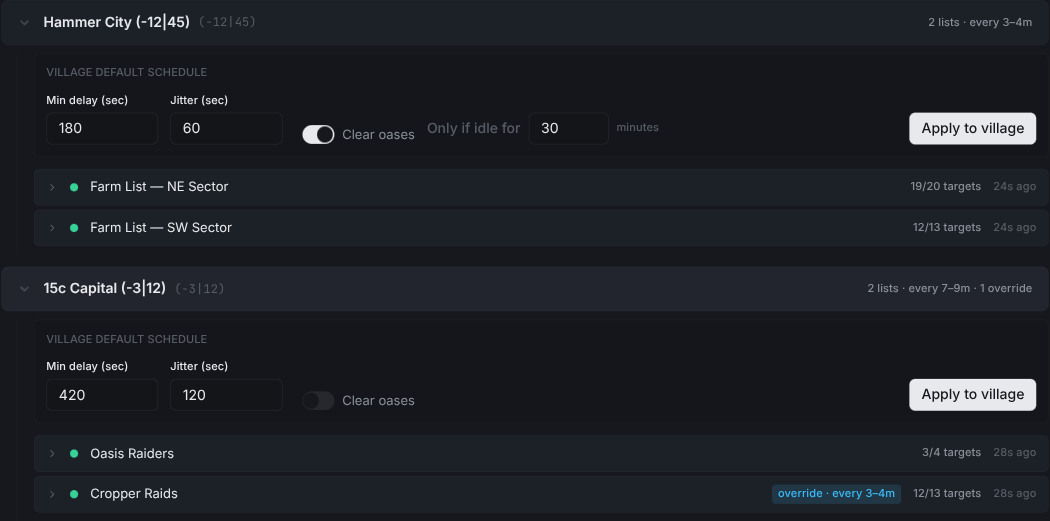
Clear oasesclears the list oases before each run. Use the farm guide for village and list setup.Only if idle forskips oases you cleared within that many minutes.Re-clear after fatal reportsin the clearing strategy sends another wave once an oasis kills troops.Auto-clear oases on casualtieson an expanded list row does the same for one list only.
Farm the respawns
Animals return between raids, so match your oasis raid cadence to travel time and clearing needs. Keep oasis targets in their own list when their travel times differ from your player farms. Use Only if idle for to avoid repeating a clear too soon after the last one.
For village timing and list overrides, follow the Travian farm bot guide for farm lists. Use Add to targeted raids for a one-off attack instead of adding the tile to a list.
Level the hero on oases
The Hero Training tab runs a hunting loop over a pool of oases you pick. It sends the hero out, reads the report, and rests it before the next hunt.

Below it, one panel holds every training setting. Each change shows its effect at once, so you can see whether the loop will hunt anything before you leave the page.
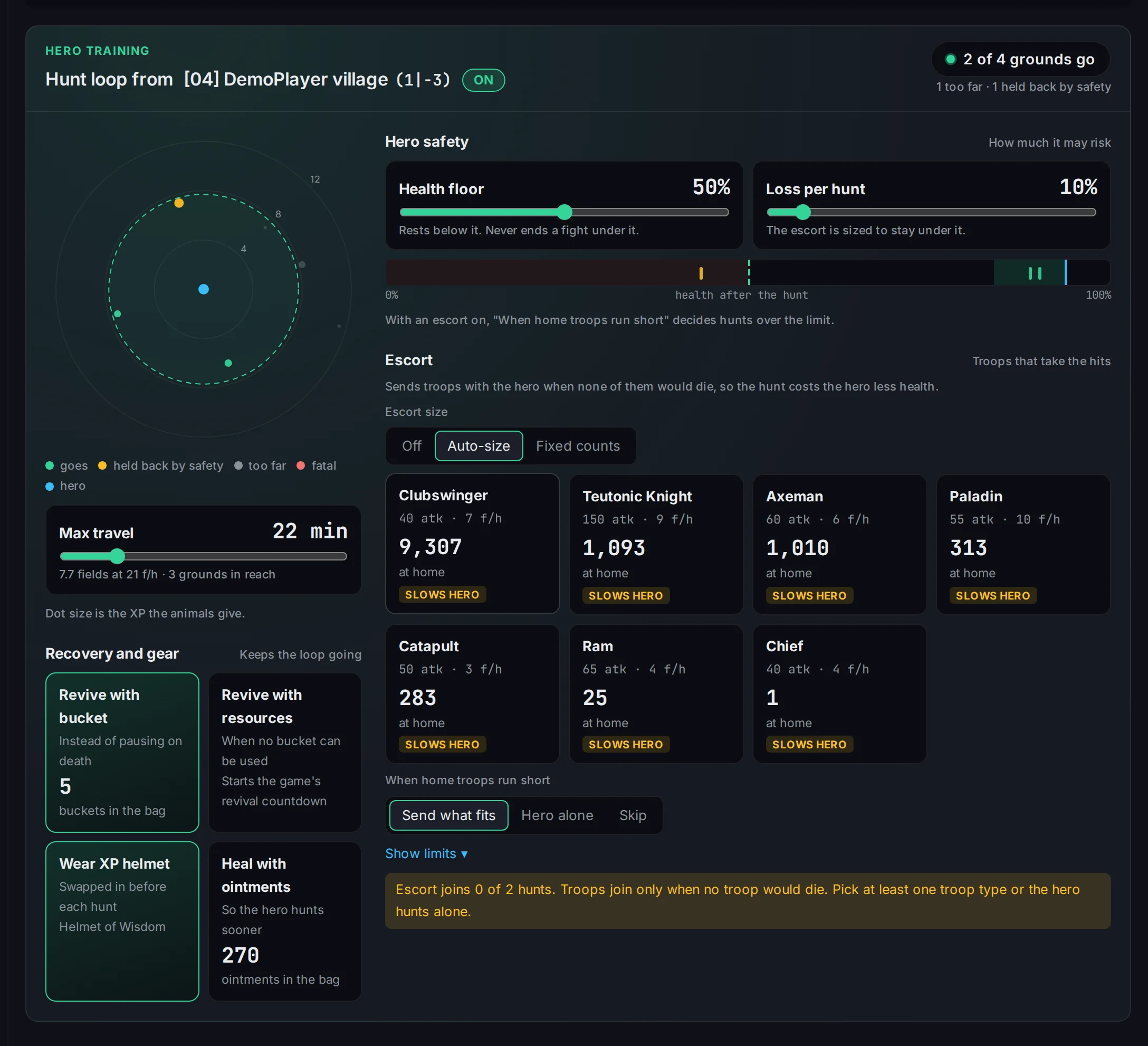
- The pill in the title starts and stops the loop. The answer at the top right counts the grounds the hero will hunt with your settings. When the count is 0, the line under it says why, for example
Nearest ground is 16 min away. - The radar puts your training grounds around the hero's village. Green dots go, amber dots are held back by a safety rule, grey dots are too far, and red dots would kill the hero. The dashed circle is how far the hero rides within
Max travel, one way. Health flooris the health the hero rests below. The loop also skips any fight predicted to end under it.Loss per huntis the most health one hunt may cost. The strip under the sliders shows where each hunt in reach leaves the hero. With the escort off,Solo hunt over the loss limitdecides:Skip itholds the hero back,Allow itlets it go.Escortsends troops with the hero when none of them would die, so the hunt costs the hero less health.Auto-sizepicks the counts from the troop types you select, andFixed countssends the numbers you set. The line at the bottom says how many hunts the escort joins right now, and why it stays home when it joins none. A slow escort also slows the hero, so fewer grounds fit insideMax travel.- The recovery tiles revive the hero with a bucket or with village resources, wear your best XP helmet on each hunt, and heal the resting hero with ointments. Each tile shows what you have left in the hero's bag.
Build the pool from Farms > Oasis Scanning with Add to training grounds, one row at a time or in a batch.
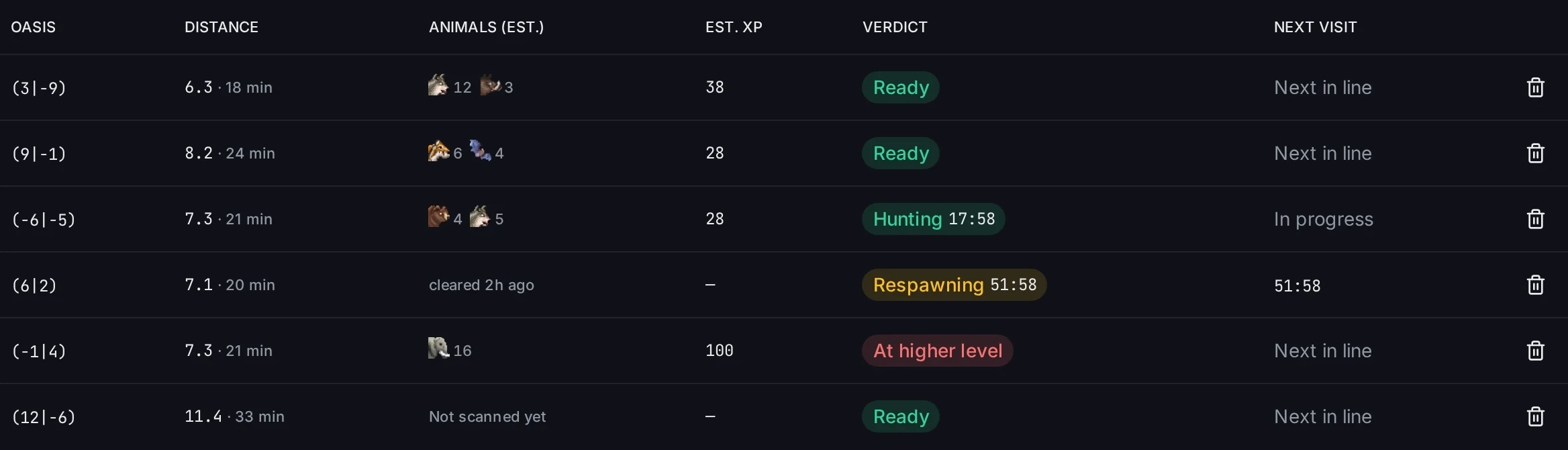
EST. XPis what the loop expects from the animals on that tile. It takes the ground with the best estimated XP per hour first.HEALTH COSTis the health the hero is predicted to lose on that hunt.Goesis in line for a hunt.Too far,Below floor,Over loss limit, andFatalname the setting or the fight that holds a ground back.Huntingcounts down the trip, andRespawningwaits until the animals are worth another visit.
Tip: Keep the default
Health flooruntil you have watched a few hunts come home intact, then lower it if you want thinner margins.
For list schedules and fatal report handling, see the Travian farm bot guide. To rank oasis targets by yield, continue with the Farm Optimizer guide. New to the app? Start with Getting Started.
Frequently asked questions
How does Vangrd farm oases automatically?
Scan a radius in Farms > Oasis Scanning, add the results to a farm list, and let the list schedule raid them. Vangrd clears the animals before each run when Clear oases is on for that village or list.
Is the oasis resource bonus the same thing as oasis farming?
No. The +25% or +50% bonus on a tile goes to whichever village holds the oasis, which scan results show as Occupied. Raiding an oasis takes its bounty and never gives you the bonus.
How does Vangrd decide an oasis is safe to clear?
The risk preset decides. Careful only attacks when it wins without losses, Balanced tries a zero-loss clear first and otherwise needs the bounty to beat the losses by a margin, and Aggressive accepts thin margins. The estimate also pads for animals that respawn while your troops are in the air.
Do cleared oases stay cleared?
No, animals come back over time, which is what makes an oasis a repeating target. Turn on Clear oases for the village to clear before each run, and Re-clear after fatal reports to send another wave once an oasis kills troops.
How do I level my hero on oases?
Pick oases in Farms > Oasis Scanning with Add to training grounds, then switch the loop on with the Off pill at the top of the Hero Training panel. The loop takes the ground with the best estimated XP per hour, sends the hero, reads the report, and rests it before the next hunt.
How are the troops for oasis clearing configured?
Open Farms > Oasis Scanning > Configure. Pick troop types under Clear with and choose a risk preset. Careful requires a win without losses. Balanced is the default. Aggressive accepts thin margins. These settings apply to every list that clears oases.
What scan radius should I use?
Pick the radius that matches the travel time you want your raids to have, measured from the village that sends them. Use the Distance filter to trim results that came back too far out.
Vangrd is a Travian bot that runs your account from the cloud, 24/7. Before you choose, see the best Travian bot 2026 comparison.
More guides
Travian Farm Bot: Automate Farm Lists and Raids
Run Travian farm lists on a schedule with jitter, per-list overrides, loss handling after fatal reports, and yield tuning. Set up the Vangrd farm bot.
Travian Farm List Optimizer: Maximize Yield Per Wave
Turn on auto-optimize and auto-tune per list, set cadence, and preview exact changes before they apply, all in one panel.
Travian Defense Bot: Auto-Dodge, Reinforcements, and Attack Alerts
Set Travian defense per village and threat level: auto-dodge, call reinforcements, spend or ship resources, and get Discord or Telegram alerts.