Travian Farm List Optimizer: Maximize Yield Per Wave
Open the optimizer
Click Optimize farm lists at the top of Farms > Farm Lists. The panel has two sections: one for what runs on its own, one for previewing changes right now.
Set what runs automatically
The top section controls auto-optimize and auto-tune across your account and per list.
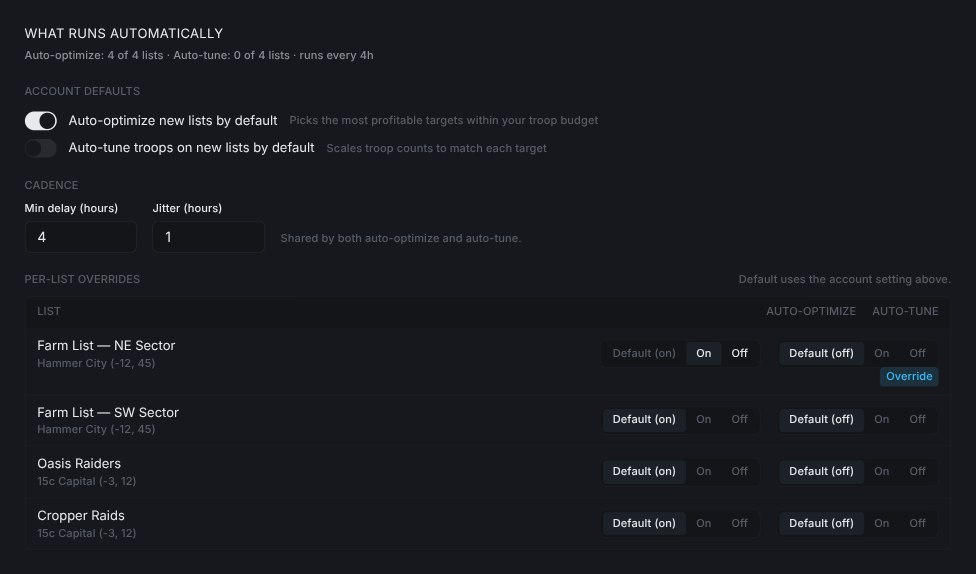
Auto-optimize new lists by defaultpicks the best-yielding targets within your troop budget.Auto-tune troops on new lists by defaultchanges how many troops each target gets so waves line up with what the target is worth.- The two switches are independent. You can have one on and the other off.
Pick a cadence
Min delay (hours) and Jitter (hours) set how often the jobs run. Both auto-optimize and auto-tune share the same cadence.
Min delayis the shortest gap between runs.Jitteradds randomness so runs don't fire at exact intervals.
Override one list at a time
Each list has its own pill for auto-optimize and auto-tune: Default / On / Off.
Defaultfollows the account switch above.OnorOffoverrides just that list. AnOverridebadge appears under the pill.- Use this when one list should always run untouched, or another should re-tune more aggressively than the rest.
Flip overrides from the list row
You can also set overrides on the expanded list row under Farms > Farm Lists.

- Each switch shows the effective state: its own override, or the account default.
(reset to account default)appears once you've flipped a switch. Click it to drop the override.
Apply changes now
Expand Apply changes now to see exactly what the optimizer would do right now and push it out manually. Leave the section collapsed if you only want the jobs to handle it.
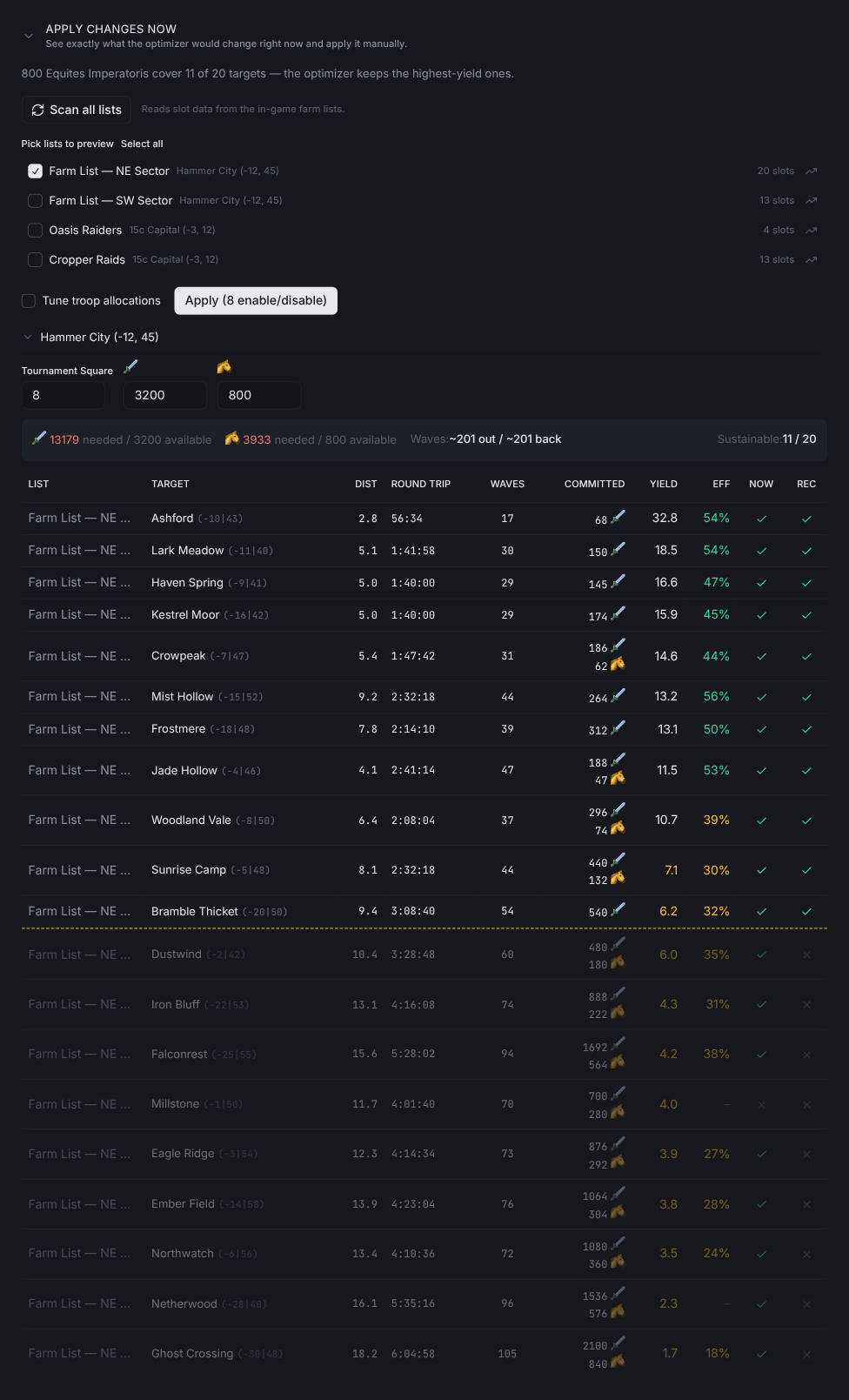
Scan all listsreads fresh slot data from the game.- Tick the lists you want to preview.
Select allticks every scanned list. - Set the real
Tournament Squarelevel and troop counts for each village. The summary bar turns red when demand is over budget. Tune troop allocationstunes troop counts as part of the same apply.Applyshows how many targets it will enable, disable, and tune before sending anything.YIELDranks targets by resources per troop sent.COMMITTEDis how many troops each target needs while waves are in flight.NOWis the current in-game state;RECis what it will be after you apply. The dashed line marks where the village runs out of troops.
Split a village across schedule buckets
When a village has lists on different schedules, the optimizer splits its troop budget between them.
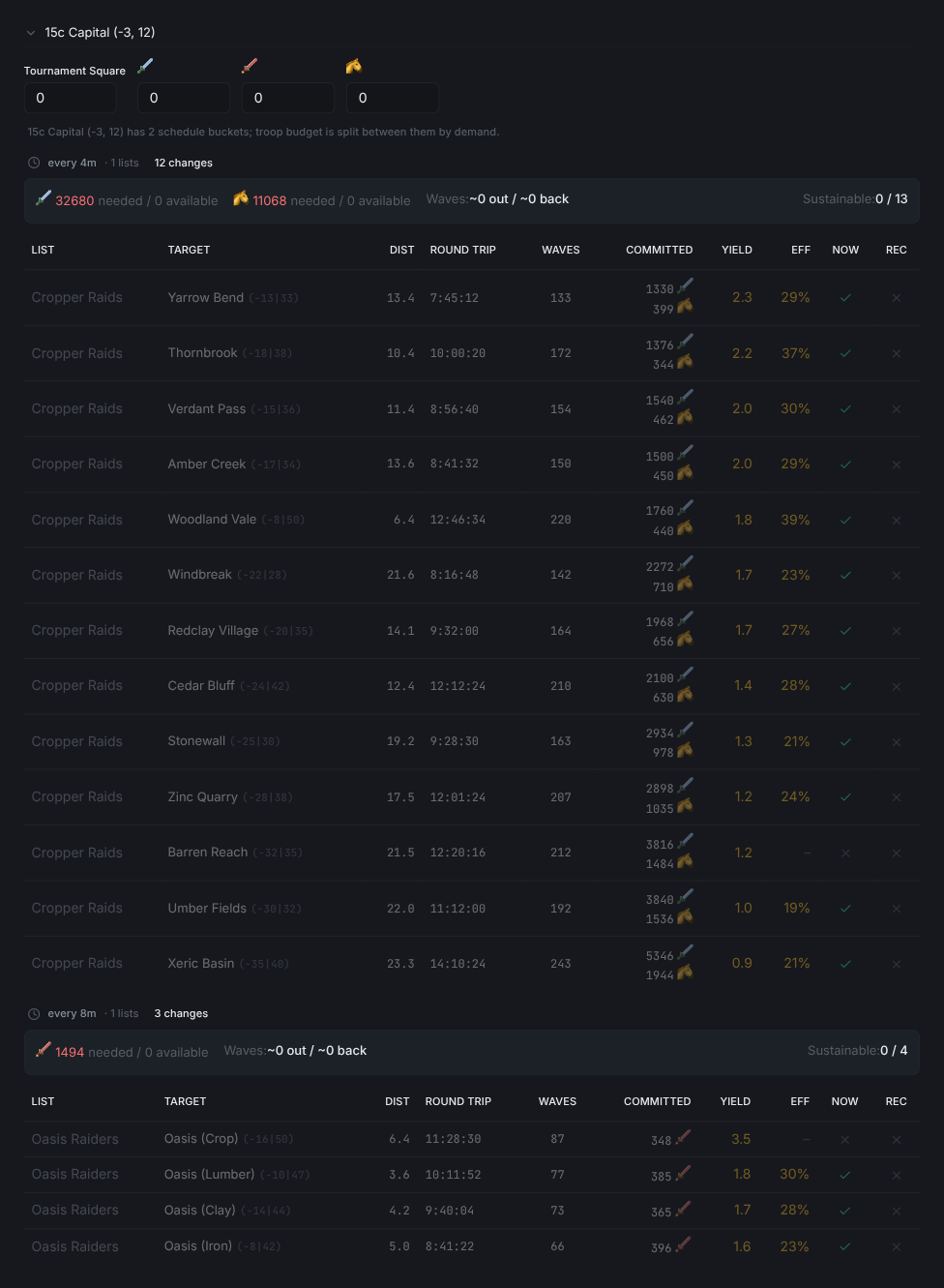
- Lists in one village with different schedules become separate buckets.
- The faster bucket gets more troops per target because it runs more often.
- Each bucket gets its own table. Look for the
{village} has N schedule bucketsnote at the top.
Tip: Flip auto-tune to
Onfor a single hammer list first to see how tuning changes its slots before turning it on everywhere.
For list setup and schedules, see the Farm Lists guide. Oasis targets have their own clearing and respawn rules, covered in Travian oasis farming. New accounts should start with Getting Started.
Frequently asked questions
What does the farm list optimizer actually change?
It ranks every scanned target by resources gained per troop committed and enables the best ones your troops can cover. Targets that no longer fit the village troop budget get switched off.
What is the difference between auto-optimize and auto-tune troops?
Auto-optimize picks which targets a list raids. Auto-tune changes how many troops each target gets. The two switches are independent, so you can run either one on its own.
How often does the optimizer run?
Min delay (hours) sets the shortest gap between runs and Jitter (hours) adds randomness on top. Auto-optimize and auto-tune share the same cadence.
Can one farm list keep its own settings?
Yes. Each list has a Default / On / Off pill for auto-optimize and auto-tune, and an Override badge appears once you pick one. The same switches sit on the expanded list row under Farms > Farm Lists.
How do I see what it will change before it applies?
Expand Apply changes now, run Scan all lists, then tick the lists you want to preview. The table shows the current state (NOW) and the recommended one (REC) per target, and Apply reports how many targets it will enable, disable, and tune before anything is sent.
Why does one village show more than one table?
Lists in the same village with different schedules become separate buckets, and each bucket gets its own share of the troops. The faster bucket gets more troops per target because it raids more often.
Vangrd is a Travian bot that runs your account from the cloud, 24/7. Before you choose, see the best Travian bot 2026 comparison.
More guides
Travian Oasis Farming: Clearing, Raiding, and Hero XP
Set up Travian oasis farming end to end: scan nearby oases, clear the animals safely, raid the respawns on a schedule, and level your hero on them.
Travian Farm Bot: Automate Farm Lists and Raids
Run Travian farm lists on a schedule with jitter, per-list overrides, loss handling after fatal reports, and yield tuning. Set up the Vangrd farm bot.
Travian Defense Bot: Auto-Dodge, Reinforcements, and Attack Alerts
Set Travian defense per village and threat level: auto-dodge, call reinforcements, spend or ship resources, and get Discord or Telegram alerts.