Travian Defense Bot: Auto-Dodge, Reinforcements, and Attack Alerts
See every incoming on the Defense page
The Defense view lists every threat across your account in one place.
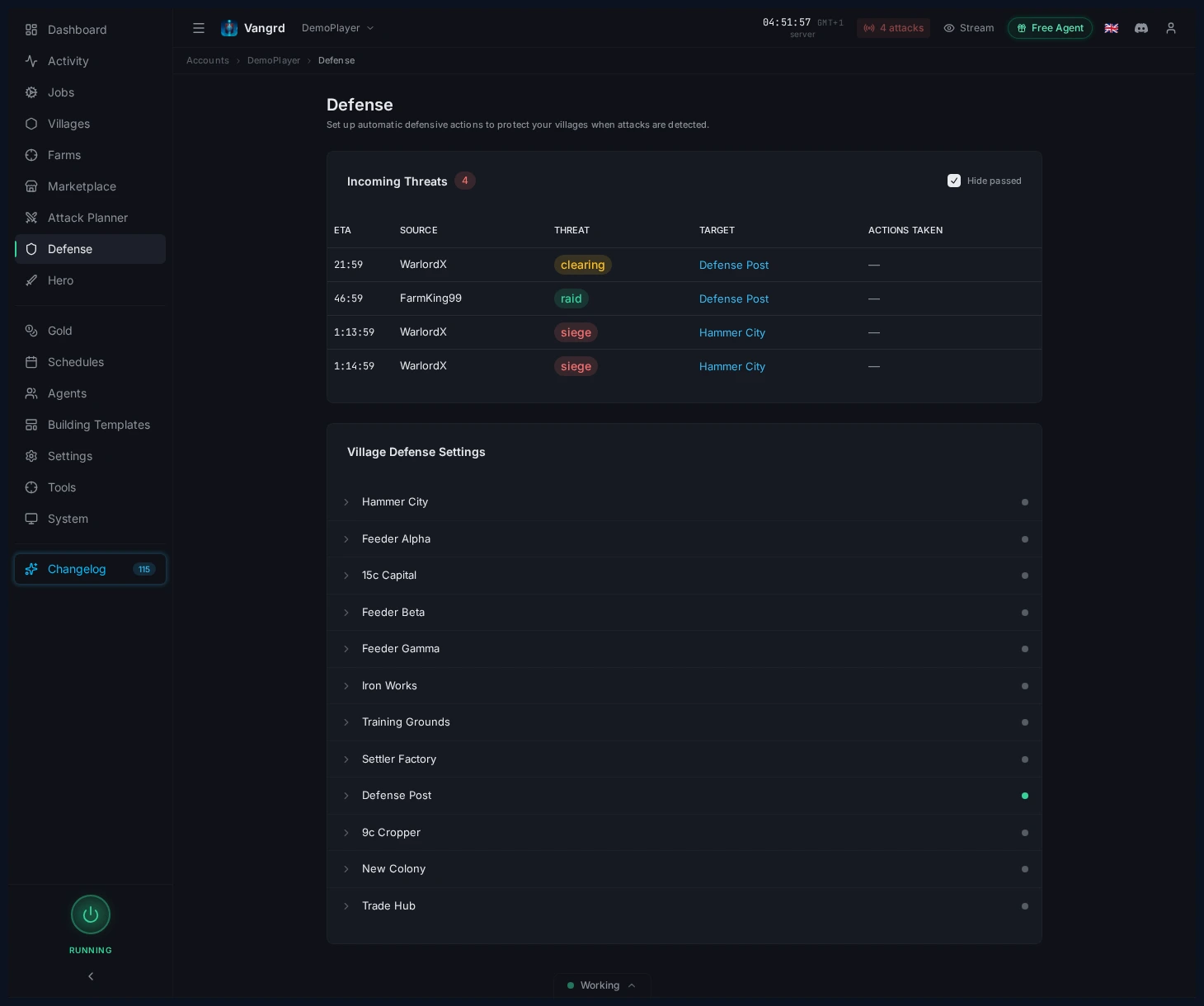
- Check which village is hit next at a glance.
- Triage from this table when multiple villages are threatened.
- Expand a village to change its response rules.
Expand a village to define responses
Each village has its own defense rules.
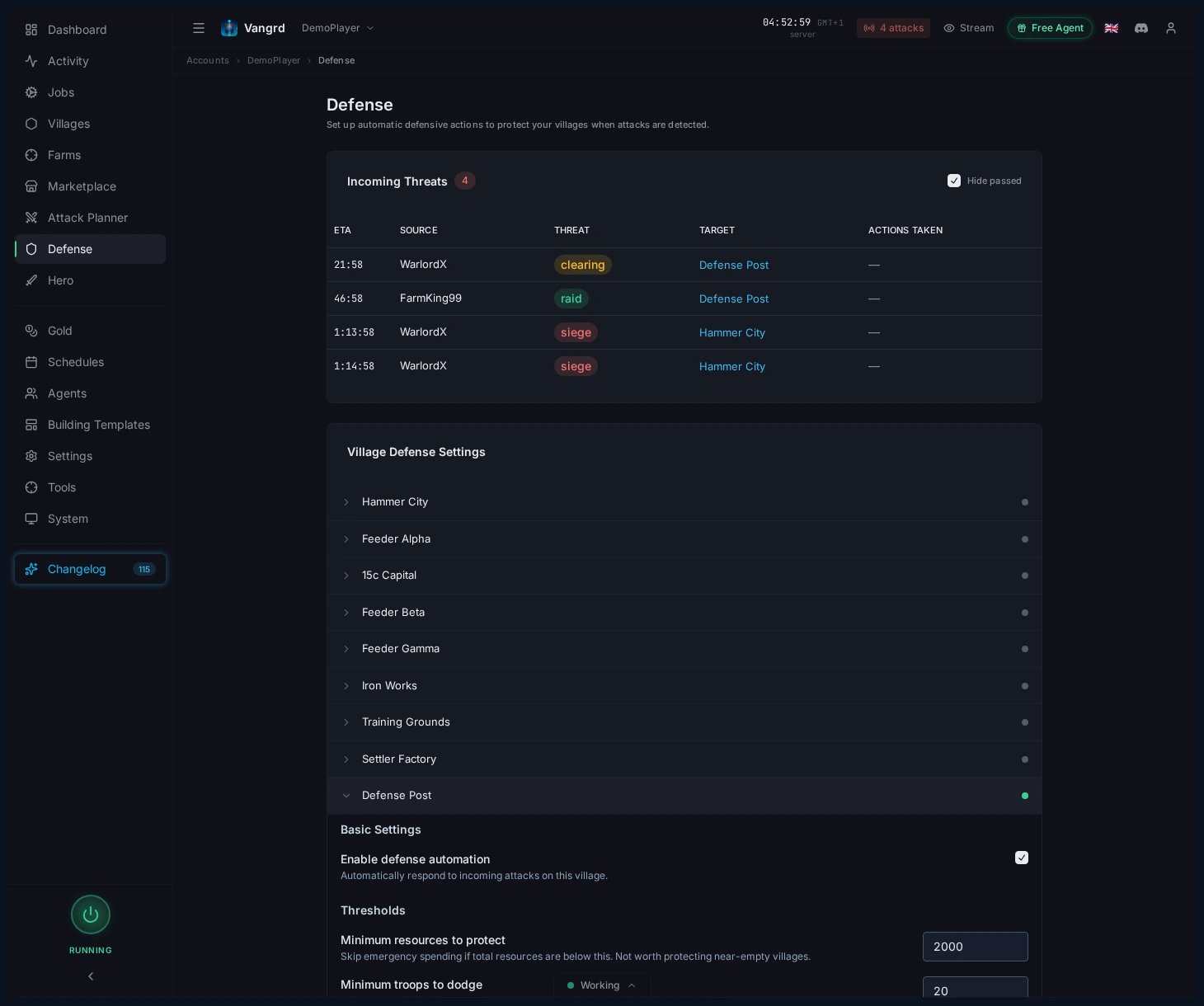
Enable defense automationtoggles automation for the village.Minimum resources to protectskips nearly empty villages.Minimum troops to dodgeignores stacks too small to bother moving.Threat Responsessplits behavior by attack type.Notificationscontrols when alerts fire outside the app.
Responses you can set per threat level
Set a separate response for Raid, Clearing, Siege, and Chiefing in each village.
Auto-spend resourcestrains troops using the village's training priorities.Also start a celebrationallows emergency spending on a Town Hall celebration. This setting is off by default.Send resourcesships resources to chosen own villages in your priority order.Dodgemoves troops to your chosen coordinates before impact.- A dodge sent as a raid returns after the trip. A dodge sent as a reinforcement stays at the destination.
Call reinforcementsuses troops from chosen own villages, with arrival planned before impact.- Set separate react times for resource actions and troop actions.
Choose a troop action for each level. A dodge and a reinforcement response serve different village needs. Check the selected destination and source villages before you enable the rule.
Tip: Start with rules for your capitals and hammers, then configure the remaining villages.
How Vangrd classifies an incoming attack
Vangrd uses four threat levels: raid, clearing, siege, and chiefing. It classifies incoming attacks from the available arrival pattern and raid information.
Travel time can provide more evidence about the troops in an attack. When travel time proves siege troops or a chief, Vangrd can raise the threat level. The troop estimate never lowers a threat level. You can control this behavior with the village's threat-increase setting.
Classification is an estimate. Detection and response need a working game session and enough time before the attack. Check the arrival time and configured response when you review an incoming attack.
Watch the dashboard alert
The dashboard shows incoming attack counts before you open Defense.
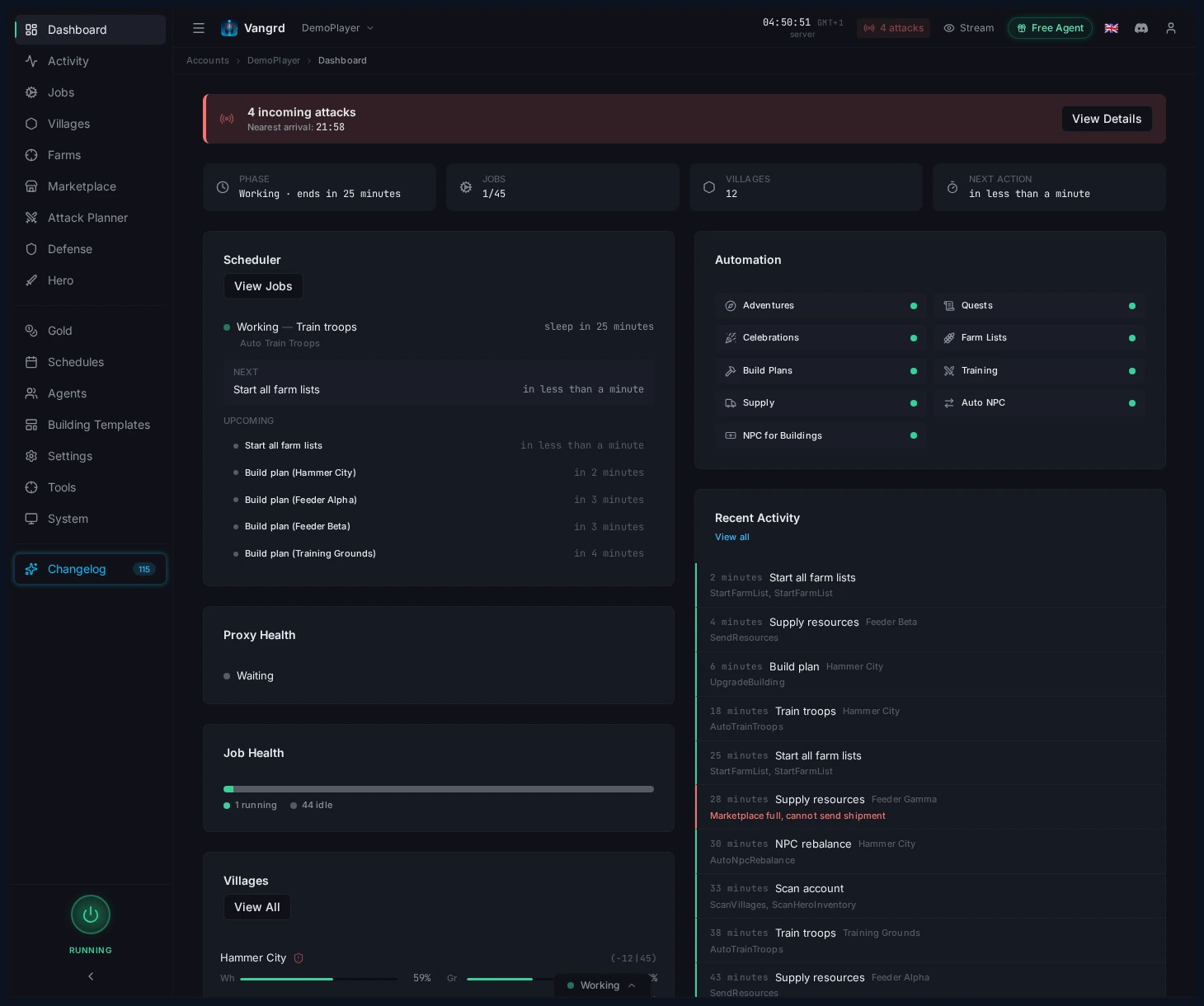
- Use the alert as a quick signal that something needs attention.
- Jump into Defense from there when the count changes.
Set Discord and Telegram alerts
Connect your Discord or Telegram notification channel in the account settings. Then choose which village threats send an alert.
- Enable notifications only on villages where the threat matters.
- Raise
Minimum threat levelon low-value villages to cut noise. - Turn on
Notify on actionswhen you need confirmation that dodges or spend-down rules fired.
To get a message when an ally is attacked, see Ally Attack Alerts.
For schedule tuning around ownership and activity windows, pair this with the Schedules and Safety guide. For first-time account setup, start with Getting Started.
Frequently asked questions
Does Vangrd automatically dodge incoming attacks?
Yes, when a village has defense automation enabled and the incoming threat matches a configured response. You control the behavior per threat type (raid, clearing, siege, chiefing) and can skip villages that don't meet minimum resource or troop thresholds.
Can I set different responses for raids vs. chiefs?
Yes. Each village has separate rules per threat level, so you can keep raid responses light while escalating clearing, siege, and chiefing responses on villages that matter.
Will I get a notification when an attack is incoming?
If you enable notifications on the village. Use Minimum threat level to filter out low-value incoming attacks and turn on Notify on actions when you want confirmation that a dodge or spend-down rule fired.
What should I configure first on a new account?
Protect capitals and hammers with aggressive rules, then leave feeders with basic raid responses. Set Minimum resources to protect so nearly-empty villages are ignored.
Can Vangrd spend down resources to deny attackers?
Yes, as a per-threat response. You can assign separate actions for spending resources, dodging troops, and sending notifications based on the threat level the village is seeing.
Vangrd is a Travian bot that runs your account from the cloud, 24/7. Before you choose, see the best Travian bot 2026 comparison.
More guides
Travian Alliance Attack Alerts: Telegram and Discord
Get a Telegram or Discord message when an ally you watch is attacked or raided in Travian, then plan the counterattack in one click with Vangrd.
Travian Oasis Farming: Clearing, Raiding, and Hero XP
Set up Travian oasis farming end to end: scan nearby oases, clear the animals safely, raid the respawns on a schedule, and level your hero on them.
Travian Auto Builder: Automate Building Queues and Upgrades
Set village build plans, account defaults, reusable templates, and template application in Vangrd's building automation.