Travian-Verteidigungsbot: Automatisches Ausweichen, Verstärkung und Angriffswarnungen
Alle eingehenden Angriffe auf der Defense-Seite sehen
Die Defense-Ansicht listet jede Bedrohung deines Accounts an einem Ort auf.
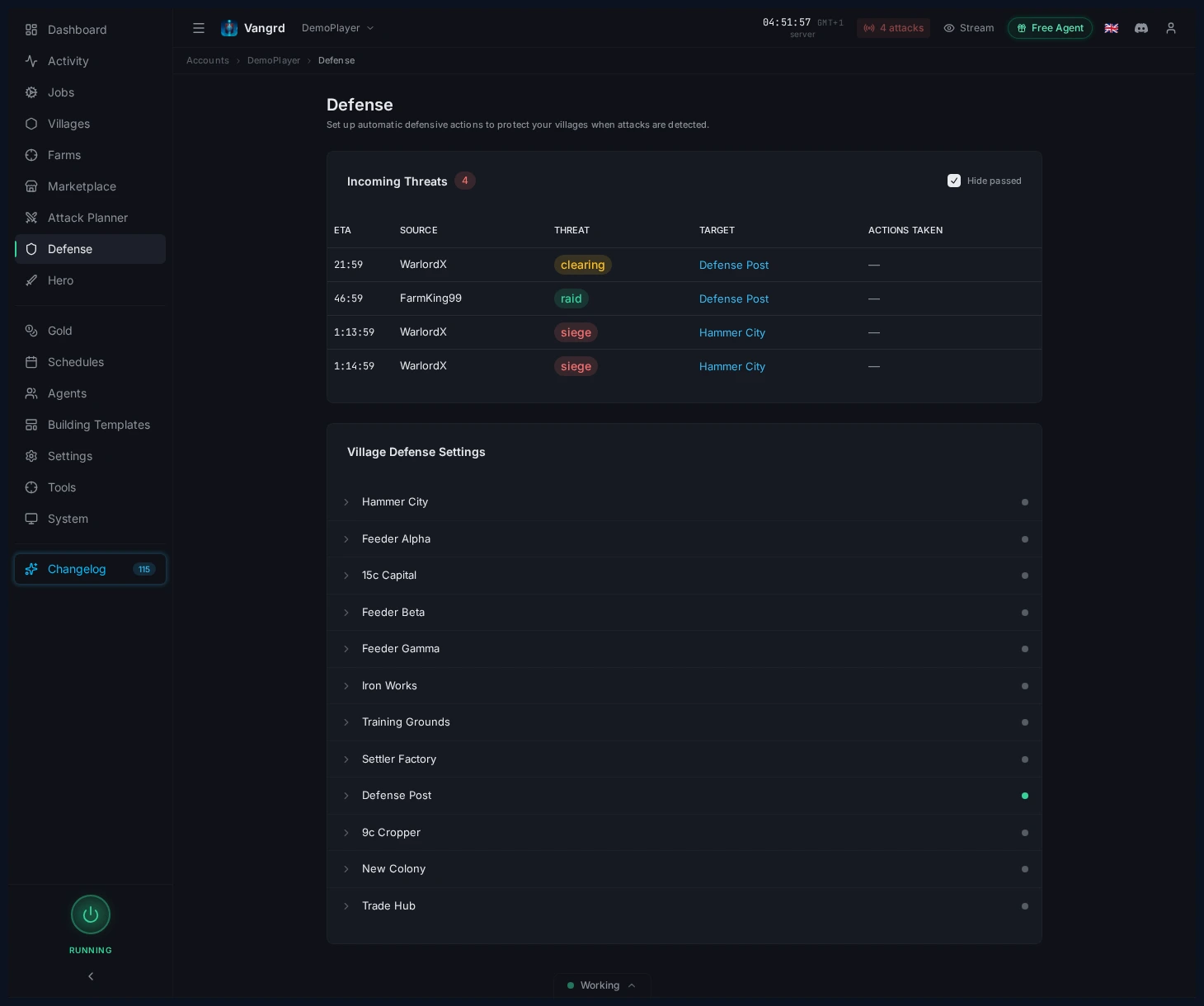
- Erkenne auf einen Blick, welches Dorf als Nächstes getroffen wird.
- Triage über diese Tabelle, wenn mehrere Dörfer bedroht sind.
- Klappe ein Dorf auf, um seine Reaktionsregeln zu ändern.
Ein Dorf aufklappen, um Reaktionen festzulegen
Jedes Dorf hat seine eigenen Verteidigungsregeln.
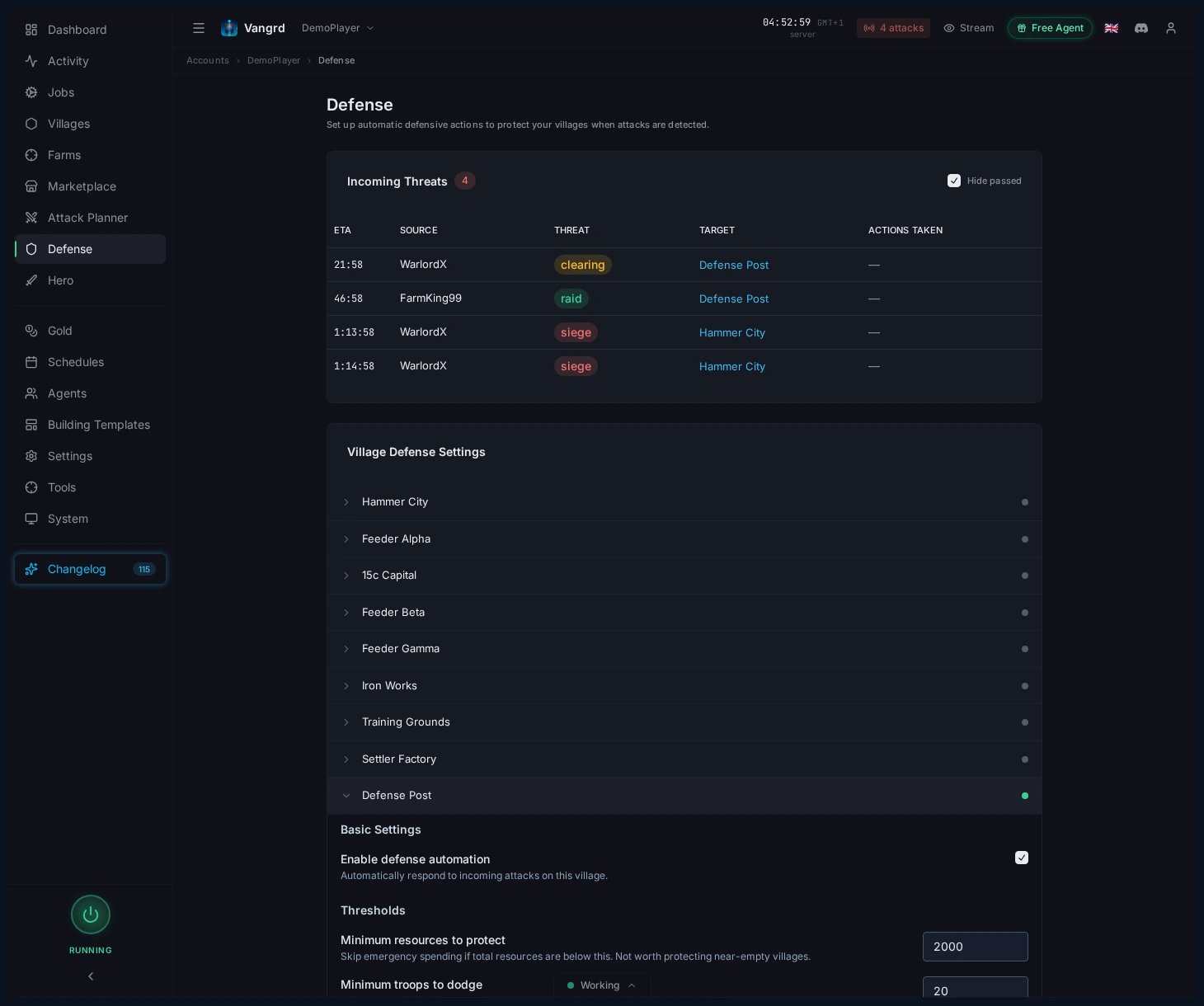
Enable defense automationschaltet die Automatisierung für das Dorf ein oder aus.Minimum resources to protectüberspringt fast leere Dörfer.Minimum troops to dodgeignoriert Truppenstapel, die zu klein sind, um sie zu bewegen.Threat Responsestrennt das Verhalten nach Angriffstyp.Notificationssteuert, wann Warnungen außerhalb der App ausgelöst werden.
Reaktionen pro Bedrohungsstufe festlegen
Lege in jedem Dorf eine eigene Reaktion für Raid, Clearing, Siege und Chiefing fest.
Auto-spend resourcesbildet Truppen nach den Trainingsprioritäten des Dorfs aus.Also start a celebrationerlaubt Notfallausgaben für ein Fest im Rathaus. Diese Einstellung ist standardmäßig aus.Send resourcesversendet Rohstoffe an gewählte eigene Dörfer in deiner Prioritätsreihenfolge.Dodgebewegt Truppen vor dem Einschlag zu deinen gewählten Koordinaten.- Als Raubzug geschickte Ausweichtruppen kehren nach der Reise zurück. Als Verstärkung geschickte Ausweichtruppen bleiben am Ziel.
Call reinforcementsnutzt Truppen gewählter eigener Dörfer und plant ihre Ankunft vor dem Einschlag.- Lege getrennte Reaktionszeiten für Rohstoffaktionen und Truppenaktionen fest.
Wähle für jede Stufe eine Truppenaktion. Ausweichen und Verstärkung erfüllen unterschiedliche Dorfbedürfnisse. Prüfe Ziel und Quelldörfer, bevor du die Regel aktivierst.
Tipp: Beginne mit Regeln für Hauptdörfer und Hammer. Konfiguriere danach die übrigen Dörfer.
Wie Vangrd einen eingehenden Angriff einstuft
Vangrd nutzt vier Bedrohungsstufen: Raubzug, Clearing, Belagerung und Adelung. Es stuft Angriffe anhand der verfügbaren Ankunftsmuster und Raubzuginformationen ein.
Die Reisezeit kann weitere Hinweise auf die angreifenden Truppen liefern. Belegt sie Belagerungstruppen oder einen Stammesführer, kann Vangrd die Bedrohungsstufe erhöhen. Die Truppenschätzung senkt die Bedrohungsstufe nie. Du steuerst dieses Verhalten mit der Einstellung zur Bedrohungserhöhung im Dorf.
Die Einstufung ist eine Schätzung. Erkennung und Reaktion brauchen eine funktionierende Spielsitzung und genug Zeit vor dem Angriff. Prüfe Ankunftszeit und eingestellte Reaktion, wenn du einen eingehenden Angriff überprüfst.
Dashboard-Warnung beobachten
Das Dashboard zeigt die Anzahl eingehender Angriffe, bevor du Defense öffnest.
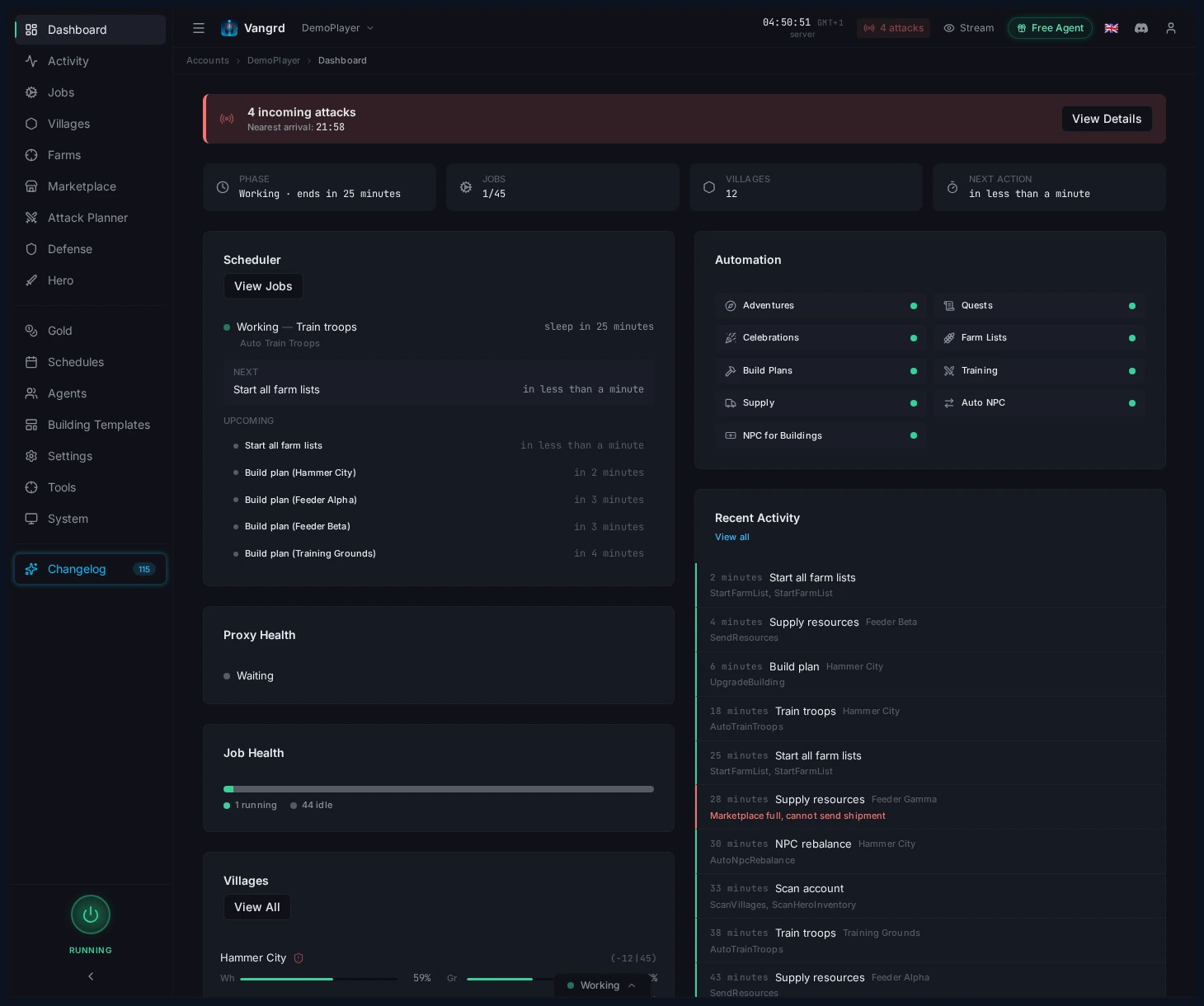
- Nutze die Warnung als schnelles Signal, dass etwas Aufmerksamkeit braucht.
- Wechsle von dort zu Defense, wenn sich die Anzahl ändert.
Discord- und Telegram-Warnungen einrichten
Verbinde deinen Discord- oder Telegram-Benachrichtigungskanal in den Account-Einstellungen. Wähle dann, welche Dorfbedrohungen eine Warnung senden.
- Aktiviere Benachrichtigungen nur für Dörfer, bei denen die Bedrohung wichtig ist.
- Erhöhe
Minimum threat levelbei weniger wichtigen Dörfern, um Rauschen zu reduzieren. - Aktiviere
Notify on actions, wenn du eine Bestätigung brauchst, dass Ausweich- oder Ausgabenregeln ausgelöst wurden.
Für Nachrichten bei Angriffen auf Verbündete lies Angriffswarnungen für Verbündete.
Für die Feinabstimmung von Zeitplänen rund um Besitz und Aktivitätsfenster kombiniere dies mit dem Leitfaden zu Zeitplänen und Sicherheit. Für die erstmalige Accounteinrichtung beginne mit Erste Schritte.
Häufig gestellte Fragen
Weicht Vangrd eingehenden Angriffen automatisch aus?
Ja, wenn für ein Dorf die Verteidigungsautomatisierung aktiviert ist und die eingehende Bedrohung zu einer konfigurierten Reaktion passt. Du steuerst das Verhalten pro Bedrohungstyp (Raid, Clearing, Belagerung, Adelung) und kannst Dörfer überspringen, die Mindestwerte für Ressourcen oder Truppen nicht erfüllen.
Kann ich unterschiedliche Reaktionen für Raids und Adelsangriffe festlegen?
Ja. Jedes Dorf hat separate Regeln pro Bedrohungsstufe, sodass du Raid-Reaktionen leicht halten kannst, während du Reaktionen auf Clearing, Belagerung und Adelung bei wichtigen Dörfern eskalierst.
Erhalte ich eine Benachrichtigung, wenn ein Angriff eingeht?
Wenn du Benachrichtigungen für das Dorf aktivierst. Nutze Minimum threat level, um weniger wichtige eingehende Angriffe herauszufiltern, und aktiviere Notify on actions, wenn du eine Bestätigung möchtest, dass eine Ausweich- oder Ausgabenregel ausgelöst wurde.
Was sollte ich bei einem neuen Account zuerst konfigurieren?
Schütze Hauptdörfer und Hammer mit aggressiven Regeln, und belasse Feeder dann bei einfachen Raid-Reaktionen. Setze Minimum resources to protect, damit fast leere Dörfer ignoriert werden.
Kann Vangrd Ressourcen ausgeben, um Angreifern Beute zu verwehren?
Ja, als Reaktion pro Bedrohung. Du kannst je nach Bedrohungsstufe, die das Dorf sieht, separate Aktionen für das Ausgeben von Ressourcen, das Ausweichen von Truppen und das Senden von Benachrichtigungen festlegen.
Vangrd ist ein Travian-Bot, der dein Konto aus der Cloud, rund um die Uhr betreibt. Sieh dir vor deiner Wahl den Vergleich der besten Travian-Bots 2026 an.
Weitere Anleitungen
Travian-Allianz-Angriffswarnungen: Telegram und Discord
Bekomm eine Nachricht in Telegram oder Discord, wenn ein überwachter Verbündeter in Travian angegriffen oder per Raubzug geplündert wird, und plane den Gegenangriff mit einem Klick in Vangrd.
Travian-Oasen-Farming: Räumung, Raubzüge und Helden-EP
Richte Travian-Oasen-Farming ein: nahe Oasen scannen, Tiere sicher räumen, wiederkehrende Tiere nach Zeitplan farmen und deinen Helden trainieren.
Travian Auto Builder: Bauwarteschlangen und Upgrades automatisieren
Lege in Vangrds Bauautomatisierung Dorf-Baupläne, accountweite Standards, wiederverwendbare Vorlagen und die Vorlagenanwendung fest.