Travian 农场机器人:自动运行农场列表和掠夺
Vangrd 通过村庄时间设置、单列表覆盖和损失处理来自动运行 Travian 农场列表。 使用电脑关闭后仍持续掠夺的云端农场机器人。
按村庄分组农场列表
农场列表面板按所属村庄对列表分组。每个村庄行显示发送间隔和列表数量。
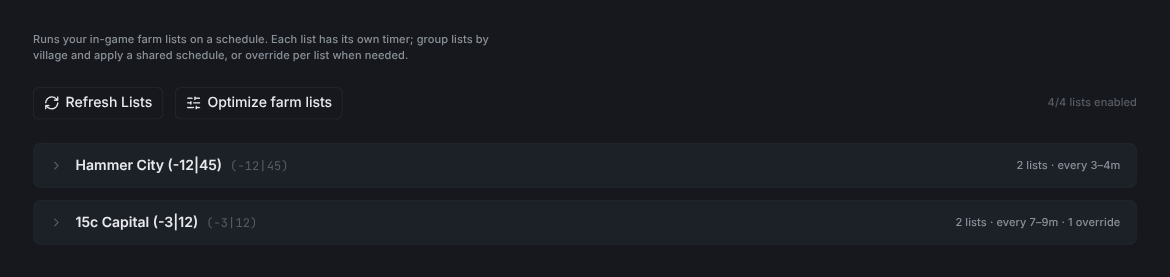
Refresh Lists会从游戏中重新读取你的农场列表。Optimize farm lists会打开优化器。- 右侧计数器显示已启用的列表数量。
将同一个日程应用到村庄中的每个列表
展开村庄即可设置它的日程。使用 Apply to village 可一次性将其应用到每个已启用列表。
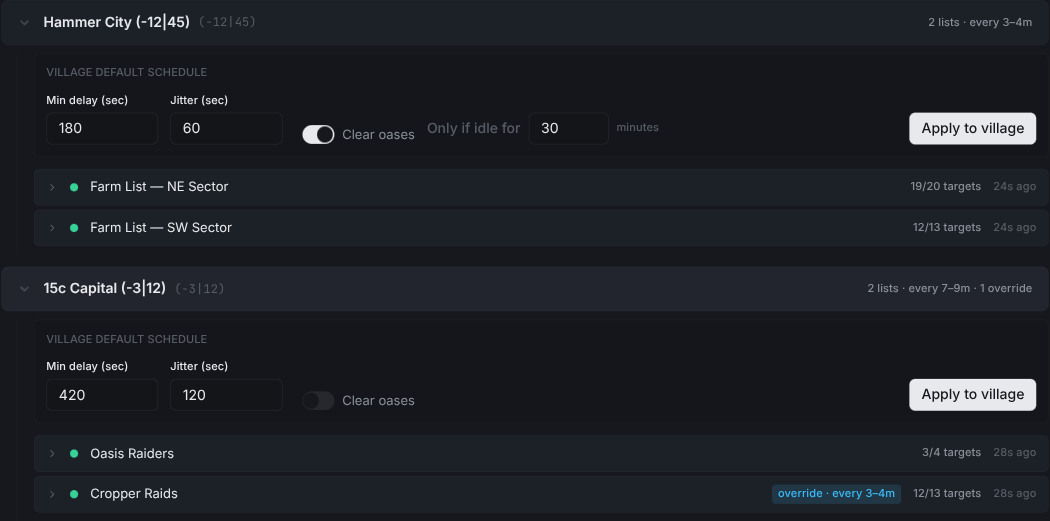
Min delay (sec)是两次运行之间的最短间隔。Jitter (sec)会加入随机性,让抢劫不会按精确间隔触发。Clear oases会在每次运行前开启自动清理。Only if idle for会跳过你刚刚清理过的绿洲。Apply to village会将此日程设置到每个已启用列表。如果某个列表已有自己的日程,替换前会先弹出对话框确认。
提示: 先设置村庄日程。然后只覆盖那些需要不同设置的列表。
覆盖单个列表的日程
展开列表即可为它设置自己的日程和操作。
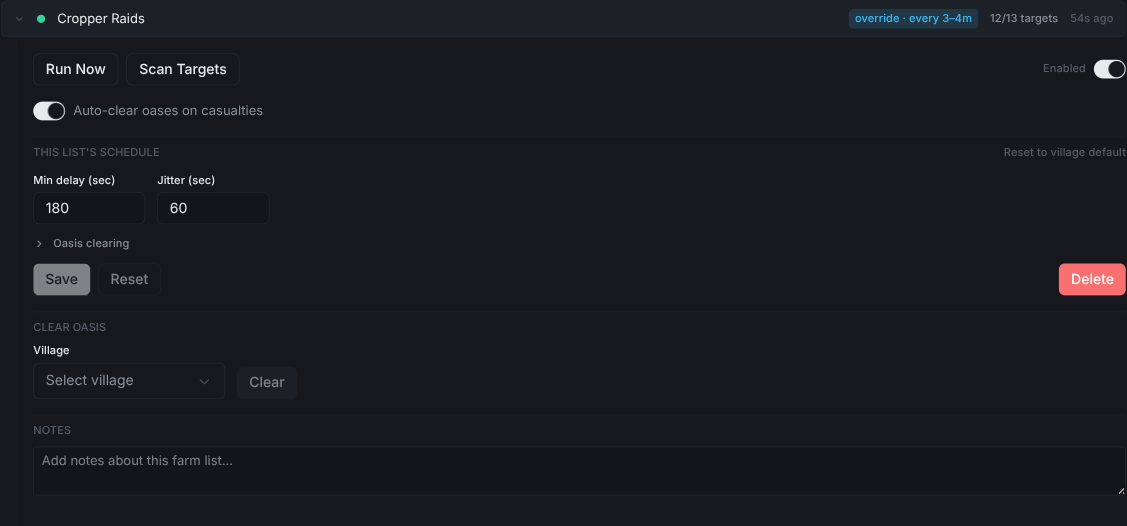
Run Now会立即发送该列表。Scan Targets会从游戏中重新读取目标。Auto-clear oases on casualties会在致命报告后再次清理绿洲。- 编辑
Min delay和Jitter可覆盖村庄日程。折叠行上会出现蓝色override · every Nm标签。 Reset to village default会移除覆盖。Delete会移除该列表的日程。
农场机器人如何决定发送时间
Min delay 设置两次运行之间的最短间隔。Jitter 在此基础上增加随机延迟。
- 在村庄行或展开的列表中设置这两个数值,单位为秒。
- 先使用村庄的时间设置,再修改需要其他间隔的列表。
- 时间设置相同的列表可以一起运行。不同的时间设置会让列表保持在单独的组中。
- 修改村庄时间设置前,检查覆盖标签。
更短的间隔会提高发送频率,但每个目标在部队返程期间也会占用部队。 使用优化器检查部队是否足够覆盖选定目标。
处理损失和全军覆没报告
启用报告分析后,Vangrd 会读取伤亡和全军覆没报告,并应用你的目标停用规则。
- 设置账号的损失策略,决定 Vangrd 何时停用目标。
- 为需要在损失后请求再次清理的列表启用
Auto-clear oases on casualties。 - 不设置列表选项即可使用账号默认值。
- 启用自动清理前,配置清理部队。
伤亡设置适用于绿洲。玩家村庄的全军覆没报告不会触发绿洲清理攻击。 损失后恢复掠夺前,检查目标和部队分配。
使用优化器调整列表
优化器在每个村庄的部队预算内,按每名士兵的收益对目标排序。 自动调优调整部队数量,自动优化选择目标。 使用农场优化器指南,在应用前预览更改。
绿洲劫掠
绿洲清理、动物重生和英雄训练有各自的设置。 这些设置请参阅 Travian 绿洲劫掠指南。
刚开始使用 Vangrd?请从入门指南开始。
常见问题
Vangrd 如何决定何时发送每个农场列表?
每个列表按自己的日程运行。Min delay 是两次运行之间的最短间隔。Jitter 会加入随机性,让抢劫不会按精确间隔触发。
列表上的蓝色覆盖标签是什么意思?
该列表使用与村庄其他列表不同的日程。展开该行可编辑它的 Min delay 和 Jitter,或点击 Reset to village default 移除覆盖。
发生致命报告后会怎样?
Vangrd 会读取报告。如果 Auto-clear oases on casualties 已开启,它会在抢劫再次开始前清理该绿洲。留空则使用账号默认设置。
Vangrd 是一款从云端,全天候运行你账号的Travian 机器人。选择之前,请查看2026年最佳 Travian 机器人对比。