Tracker giocatori Travian: monitora i giocatori e trova inattivi
Per report condivisi e dossier nemici, consulta le informazioni dell'alleanza.
Monitora i giocatori osservati da un unico pannello
Aggiungi rivali, minacce vicine e obiettivi da conquistare a una singola lista di osservazione in Tools > Player Tracking.
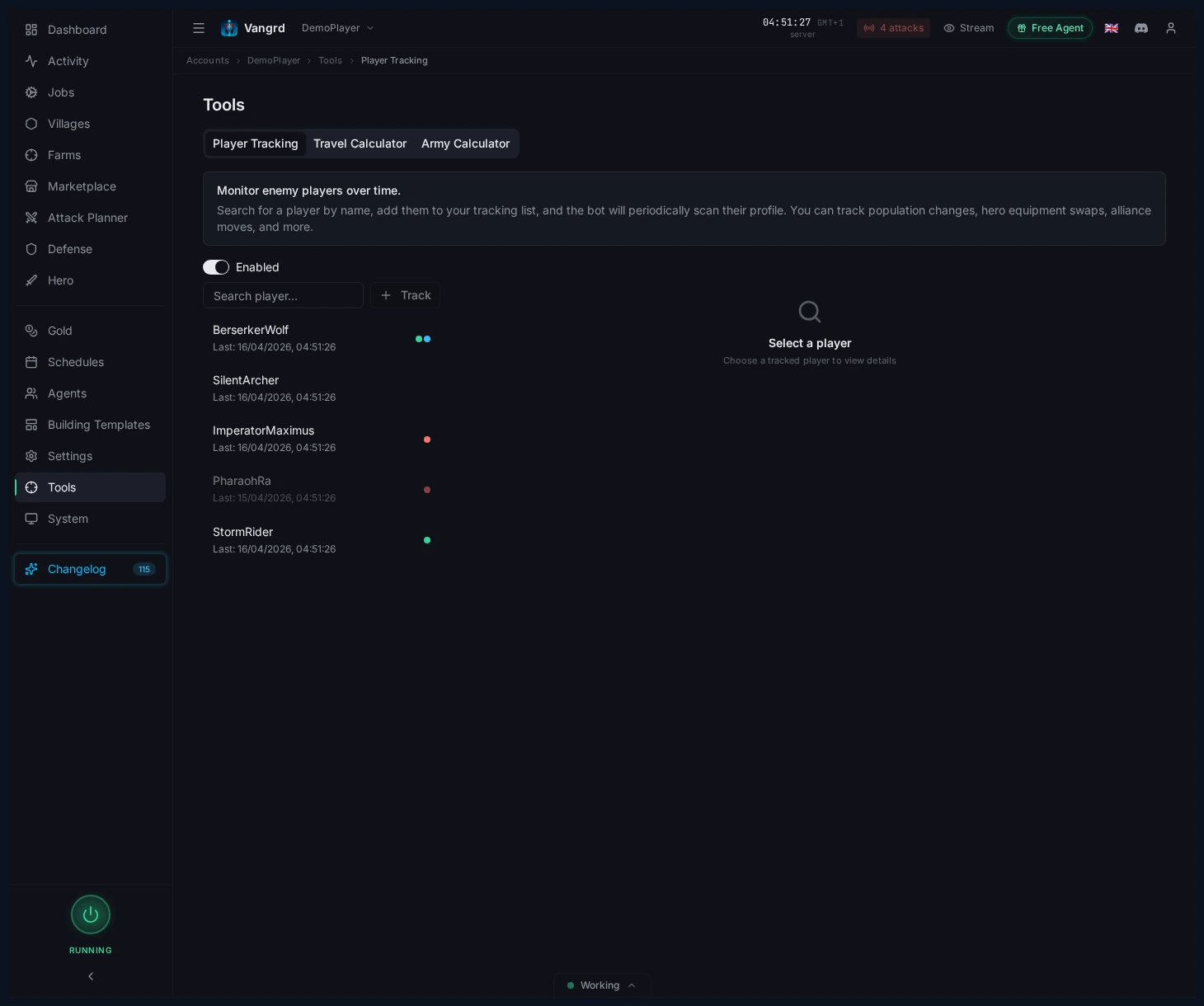
- Etichetta i giocatori con label personalizzate per filtrarli rapidamente.
- Seleziona qualsiasi giocatore per esaminare tutta la sua cronologia degli snapshot.
Esamina lo snapshot attuale di un giocatore
Seleziona un giocatore per vedere a colpo d'occhio schede statistiche, modifiche recenti ed equipaggiamento dell'eroe.
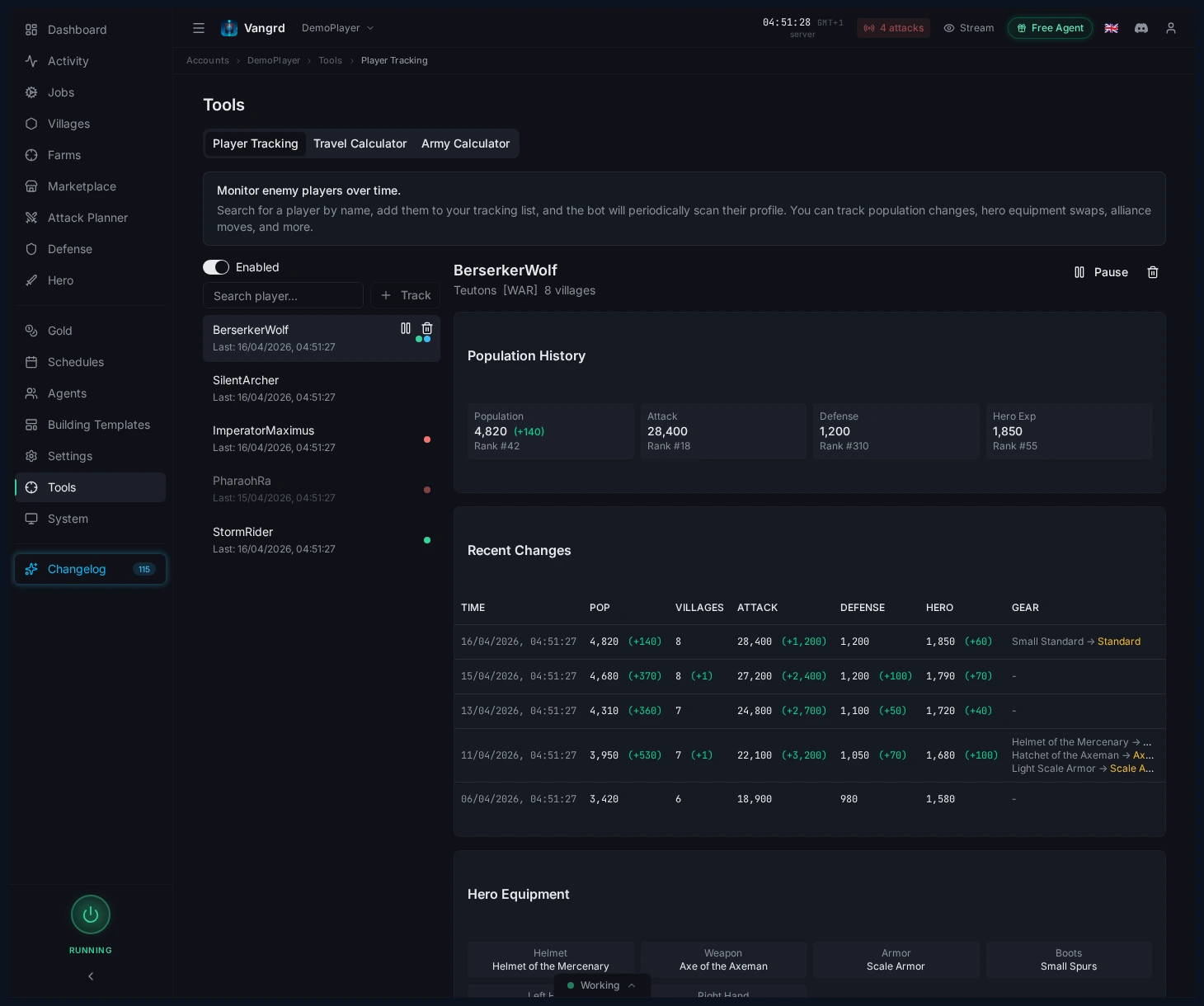
- Monitora
Population,Attack,DefenseeHero expper individuare cambiamenti improvvisi. - Controlla il numero di villaggi e le modifiche recenti prima di considerare un giocatore inattivo.
- Individua in anticipo cambi di arma o di equipaggiamento dell'eroe.
Suggerimento: Una linea della popolazione piatta abbinata a equipaggiamento dell'eroe recente conta più del rango.
Cerca villaggi vicini con Find and Probe
Cerca sulla mappa giocatori inattivi e obiettivi da esplorare con Find & Probe.
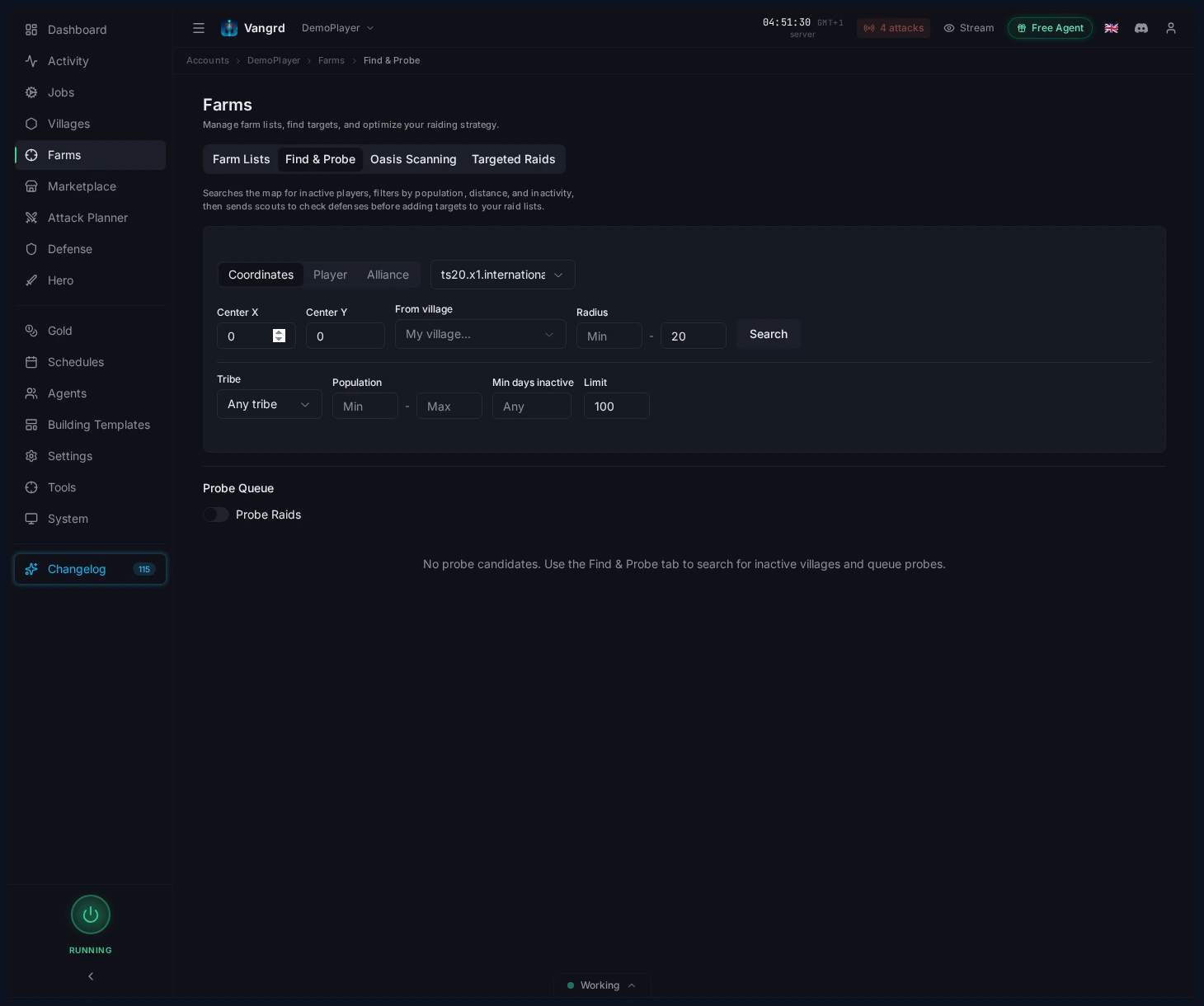
- Cerca per
coordinates,playeroalliance. - Filtra per raggio, tribù, popolazione e inattività.
- Crea una lista ristretta mirata di villaggi che vale la pena esplorare.
Metti in coda le esplorazioni e promuovi i buoni obiettivi
- Invia i villaggi promettenti nella coda di esplorazione.
- Rivedi la coda prima di inviare gli esploratori.
- Promuovi gli obiettivi sicuri direttamente nel tuo flusso di raid.
Per i raid automatizzati dopo l'esplorazione, continua con la guida all'automazione delle liste farm. I nuovi utenti dovrebbero iniziare da Primi passi.
Domande frequenti
Come inizio a seguire un giocatore Travian?
Apri Tools > Player Tracking e aggiungi il giocatore alla lista di osservazione. Usa etichette tue per tenere separati rivali, vicini e bersagli da conquistare.
Cosa registra Vangrd su un giocatore seguito?
Riscansiona il profilo a intervalli regolari e conserva ogni scansione come snapshot con popolazione, classifiche di attacco e difesa, esperienza dell'eroe, numero di villaggi, alleanza ed equipaggiamento dell'eroe. Seleziona un giocatore per leggere lo storico.
Come capisco se un giocatore è inattivo?
Cerca una curva di popolazione piatta su più snapshot, poi controlla numero di villaggi e cambiamenti recenti prima di darlo per perso. Equipaggiamento nuovo sull'eroe di un account altrimenti fermo di solito significa che qualcuno entra ancora.
Come trovo villaggi inattivi vicino a me?
Usa Find & Probe. Cerca per coordinate, giocatore o alleanza, poi filtra per raggio, tribù, popolazione e inattività per costruire una lista breve di bersagli da esplorare.
Cosa succede dopo aver spiato un bersaglio?
Manda i villaggi promettenti nella coda di sondaggio e rileggila prima di far partire gli esploratori. I bersagli sicuri passano poi direttamente nel tuo flusso di raid.
Vangrd è un Bot Travian che gestisce il tuo account dal cloud, 24/7. Prima di scegliere, consulta il confronto del miglior bot Travian 2026.
Altre guide
Farming delle oasi Travian: pulizia, raid ed esperienza dell'eroe
Configura il farming delle oasi Travian: cerca oasi vicine, elimina gli animali in sicurezza, programma raid sulle ricomparse e allena il tuo eroe.
Bot di difesa Travian: schivata automatica, rinforzi e avvisi di attacco
Imposta la difesa Travian per villaggio e minaccia: schivata automatica, rinforzi, spesa o invio di risorse e avvisi Discord o Telegram.
Travian Auto Builder: automatizza code di costruzione e potenziamenti
Imposta piani di costruzione dei villaggi, valori predefiniti dell'account, modelli riutilizzabili e applicazione dei modelli nell'automazione edilizia di Vangrd.