מתחילים עם Vangrd: חיבור חשבון והפעלת אוטומציה
Vangrd מפעיל את החשבון שלך בשרתים שלו, ואתה שולט בו דרך לוח הבקרה. לפני חיבור החשבון הראשון, קרא איך עובד בוט Travian בענן.
הוסף את החשבון הראשון שלך
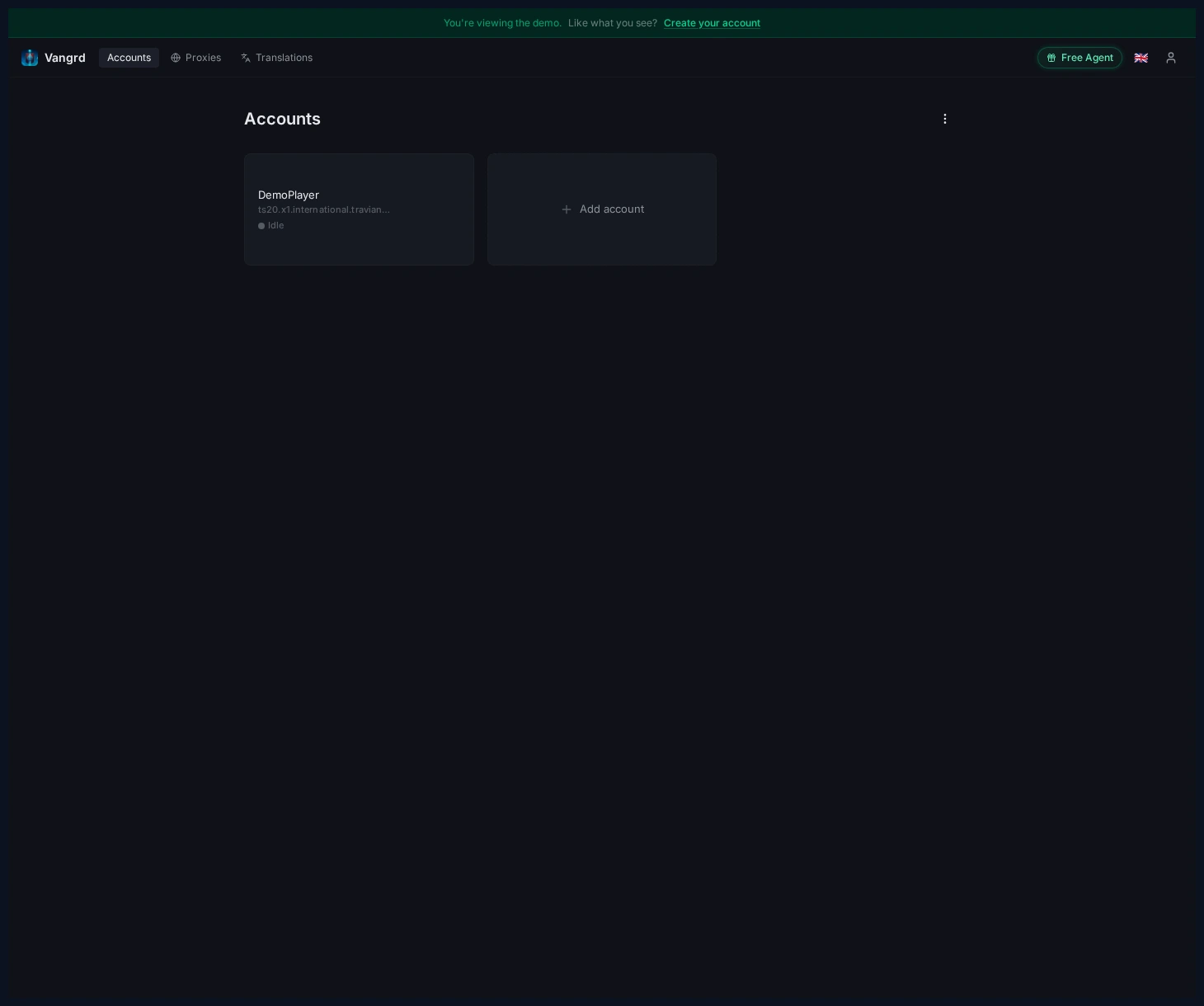
פתח את Accounts ולחץ על Add Account כדי לחבר שרת Travian.
מלא את טופס החשבון
הזן את כתובת השרת, פרטי ההתחברות, גרסת המשחק והגדרות הסוכן בדיאלוג אחד.
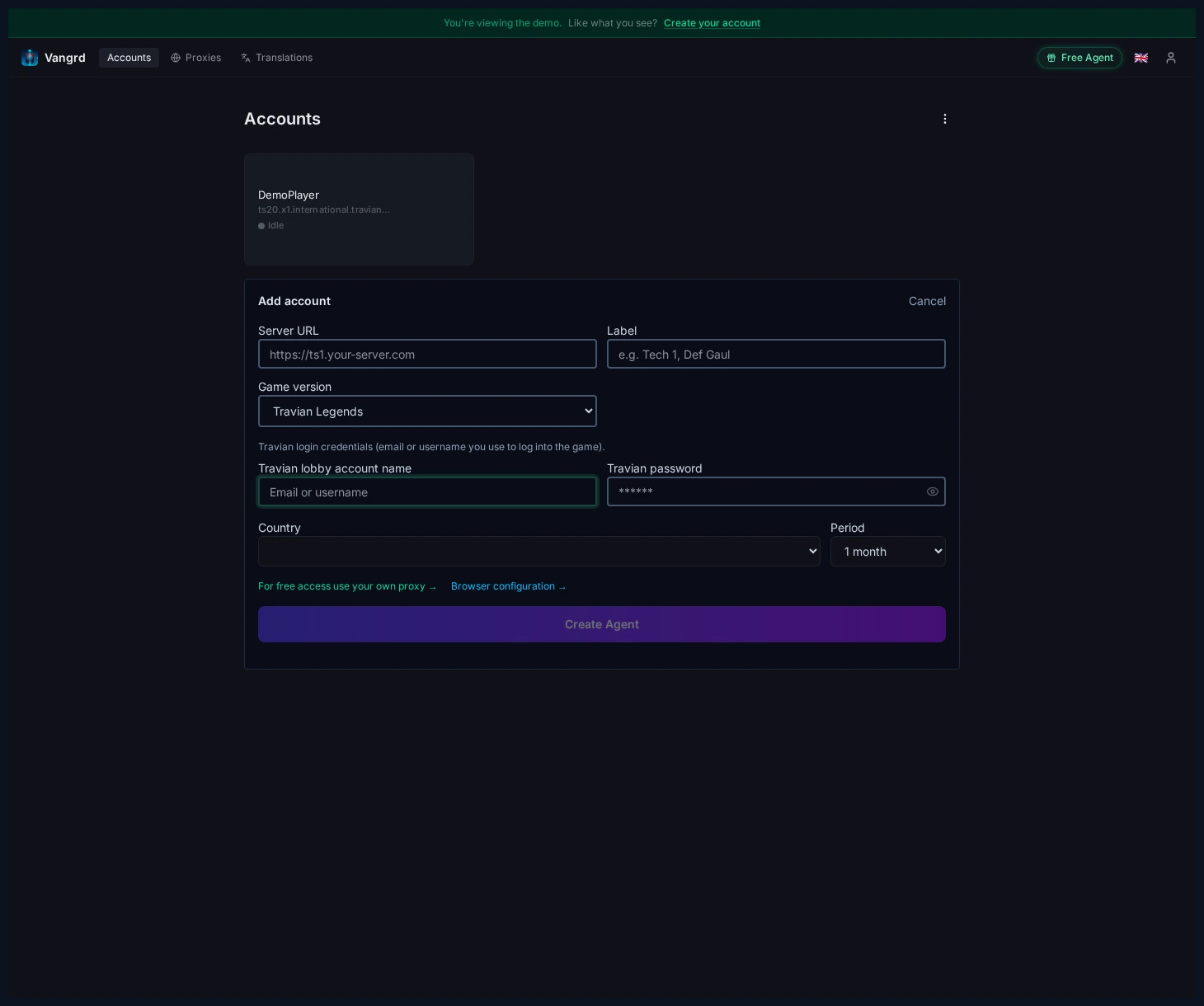
Country+Periodמגדירים את מיקום כתובת ה-IP הביתית הייעודית של הסוכן ואת תקופת החיוב.Labelנותן שם לחשבון בסרגל הצדדי. השתמש בתפקיד, לא רק בשם השרת.
בדוק קודם את לוח הבקרה
לפני שמפעילים משהו, ודא שהמתזמן פועל ושהחשבון התחבר בצורה נקייה.
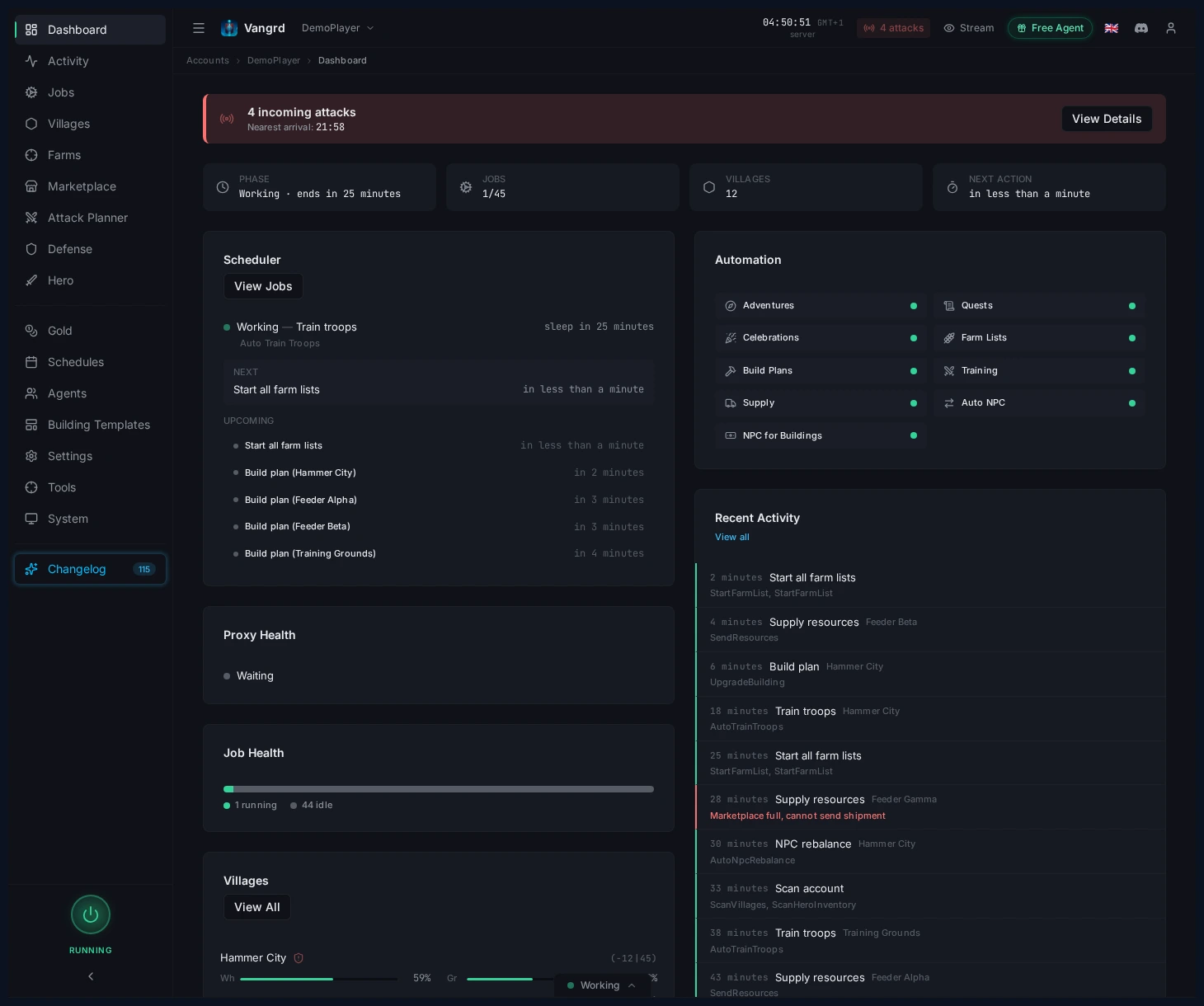
- טפל קודם בכל באנר אזהרה.
- השתמש בכרטיסי לוח הבקרה כדי לזהות תורים ריקים, עומס אחסון או התקפות נכנסות.
הפעל את האוטומציות הראשונות שלך
ארבעה עמודים מכסים את רוב מה שתצטרך:
- Villages > Development כולל תוכניות בנייה, יעדי שדות ותבניות.
- Farms > Farm Lists כולל לוחות זמנים לפשיטות, סריקות מטרות וניקוי נאות מדבר.
- Villages > Automation כולל אימון חיילים, ריפוי והגדרות מתיישבים.
- Automation > Supply / Auto NPC כולל ניתוב כלכלי ואיזון משאבים.
בנה מתוך לולאה בטוחה אחת
סבב ראשון טוב הוא פשוט:
- הגדר תוכנית בנייה לכפר הראשי שלך.
- צור או ייבא רשימת פארם אחת וסרוק את המטרות שלה.
- הפעל אימון חיילים בכפר שמזין את הרשימה הזו.
- הוסף אספקה או NPC רק אחרי ששלושת הראשונים יציבים.
לצעדים הבאים, השתמש במדריך תור הבנייה, מדריך רשימות הפארם, ובמדריך אימון החיילים.
שאלות נפוצות
מה צריך כדי לחבר חשבון Travian?
פתח את Accounts > Add Account והזן את כתובת השרת, פרטי ההתחברות, גרסת המשחק והגדרות הסוכן. Country ו-Period קובעים איפה יושבת כתובת ה-IP הביתית הייעודית של החשבון ואיך היא מחויבת.
מה כדאי לבדוק לפני שמפעילים אוטומציה?
פתח את לוח הבקרה וודא שהמתזמן פועל ושהחשבון התחבר בצורה נקייה. טפל קודם בכל באנר אזהרה, ואז קרא את הכרטיסים כדי לזהות תורים ריקים, עומס אחסון או התקפות נכנסות.
איזו אוטומציה כדאי להפעיל קודם?
התחל מתוכנית בנייה לכפר הראשי שלך. הוסף רשימת פארם אחת וסרוק את המטרות שלה, הפעל אימון חיילים בכפר שמזין את הרשימה הזו, והוסף אספקה או NPC רק אחרי ששלושת אלה פועלים בלי בעיות.
איפה מוצאים כל אוטומציה?
Villages > Development כולל תוכניות בנייה, יעדי שדות ותבניות. Farms > Farm Lists כולל פשיטות וניקוי נאות מדבר, Villages > Automation כולל אימון חיילים, ריפוי ומתיישבים, ו-Automation > Supply / Auto NPC כולל את הכלכלה.
אפשר להריץ יותר מחשבון אחד?
כן. כל חשבון מקבל כרטיס משלו בעמוד Accounts, עם סוכן, לוח זמנים ותווית משלו. תן לתווית שם לפי התפקיד של החשבון ולא לפי השרת, כדי שהסרגל הצדדי יישאר קריא.
Vangrd הוא בוט Travian שמפעיל את החשבון בענן (ענן, מסביב לשעון). לפני הבחירה, ראו את השוואת הבוט הטוב ביותר ל-Travian ב-2026.
עוד מדריכים
סטטוס בוט Travian: לראות מה הבוט עושה ולמה
בדף הסטטוס של Vangrd רואים מה בוט ה-Travian מריץ עכשיו, מה רץ בהמשך, למה משימה לא רצה ומה הסוכן ראה כשהרצה נכשלה.
לוחות זמנים לבוט Travian: טבעי, קבוע, סוכנים ובטיחות
בחרו לוחות זמנים טבעיים או קבועים, קראו כיסוי שהושג, והתאימו אזורי זמן של סוכנים, שפת דפדפן וגלישה אקראית ב-Vangrd.
איך לבנות זרימות אוטומציה מותאמות ב-Travian
שרשרו פעולות, הסתעפו לפי תנאים, ועברו בלולאה על כפרים, ואז הריצו את האוטומציה שלכם בטיימר, בלוח זמנים, או לפי דרישה עם זרימות עבודה של Vangrd.