Travian fermų botas: automatizuokite fermų sąrašus ir reidus
Vangrd automatizuoja Travian fermų sąrašus pagal kaimo intervalus, atskirus sąrašų nustatymus ir nuostolių taisykles. Naudokite debesijos fermų botą, kuris siunčia reidus ir išjungus kompiuterį.
Grupuokite fermų sąrašus pagal kaimą
Fermų sąrašų skydelis grupuoja sąrašus pagal jų kaimą. Kiekvienoje kaimo eilutėje rodomi intervalai ir sąrašų skaičius.
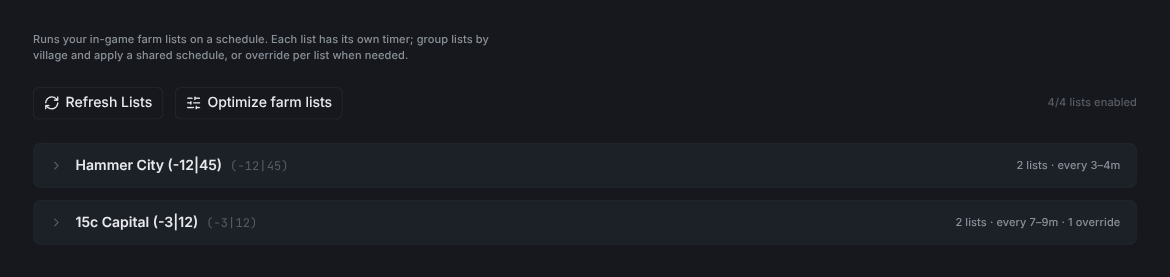
Refresh Listsiš naujo nuskaito jūsų fermų sąrašus iš žaidimo.Optimize farm listsatidaro optimizatorių.- Skaitiklis dešinėje rodo, kiek sąrašų įjungta.
Taikykite vieną tvarkaraštį kiekvienam kaimo sąrašui
Išskleiskite kaimą, kad nustatytumėte jo tvarkaraštį. Naudokite Apply to village, kad jį vienu kartu pritaikytumėte kiekvienam įjungtam sąrašui.
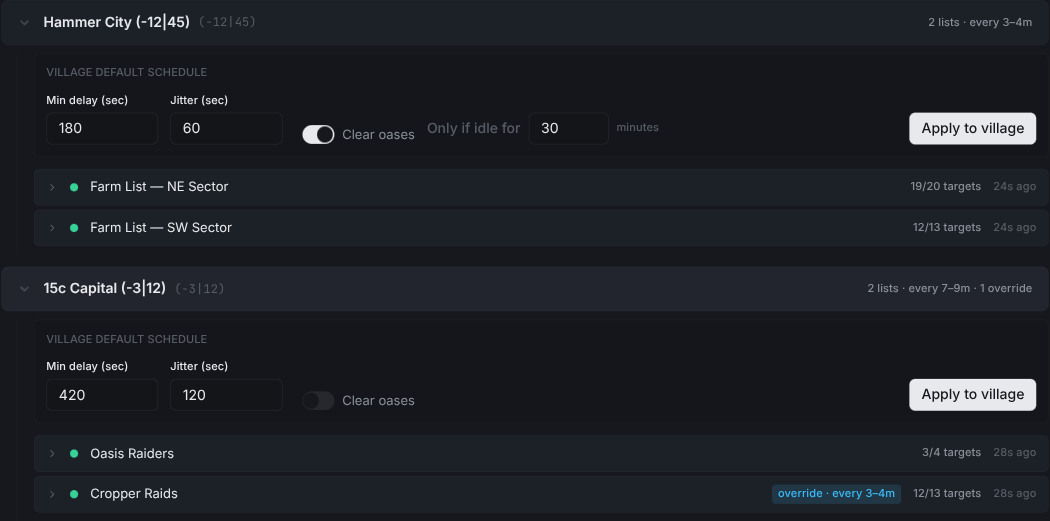
Min delay (sec)yra trumpiausias tarpas tarp paleidimų.Jitter (sec)prideda atsitiktinumo, kad reidai nebūtų siunčiami tiksliais intervalais.Clear oasesįjungia automatinį valymą prieš kiekvieną paleidimą.Only if idle forpraleidžia oazes, kurias ką tik išvalėte.Apply to villagenustato šį tvarkaraštį kiekvienam įjungtam sąrašui. Jei kuris nors sąrašas turi savo tvarkaraštį, dialogas pirmiausia paklausia prieš jį pakeisdamas.
Patarimas: Pirmiausia nustatykite kaimo tvarkaraštį. Tada perrašykite tik tuos sąrašus, kuriems reikia kažko kito.
Perrašykite vieno sąrašo tvarkaraštį
Išskleiskite sąrašą, kad suteiktumėte jam savo tvarkaraštį ir veiksmus.
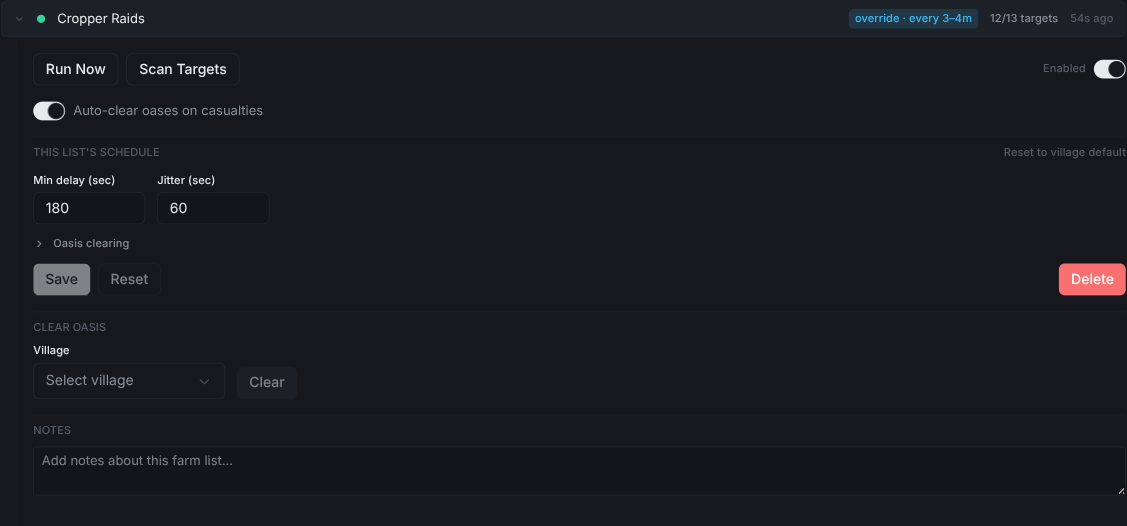
Run Nowiš karto paleidžia sąrašą.Scan Targetsiš naujo nuskaito taikinius iš žaidimo.Auto-clear oases on casualtiespo mirtinos ataskaitos vėl išvalo oazę.- Redaguokite
Min delayirJitter, kad perrašytumėte kaimo tvarkaraštį. Suskleistoje eilutėje atsiranda mėlynaoverride · every Nmžyma. Reset to village defaultpašalina perrašymą.Deletepašalina sąrašo tvarkaraštį.
Kaip fermų botas parenka siuntimo laiką
Min delay nustato trumpiausią intervalą tarp paleidimų. Jitter prideda atsitiktinį vėlavimą.
- Abi reikšmes sekundėmis nustatykite kaimo eilutėje arba išskleistame sąraše.
- Pradėkite nuo kaimo intervalų ir keiskite tik sąrašus, kuriems reikia kitokio intervalo.
- Vienodų intervalų sąrašai gali veikti kartu. Kitokie intervalai palieka sąrašą atskiroje grupėje.
- Prieš keisdami kaimo intervalus patikrinkite atskiro nustatymo žymą.
Trumpesnis intervalas leidžia siųsti dažniau, bet kiekvienas taikinys užima karius ir grįžimo metu. Optimizavimo įrankiu patikrinkite, ar karių pakanka pasirinktiems taikiniams.
Nuostolių ir pražūtingų ataskaitų valdymas
Įjungus ataskaitų analizę, Vangrd skaito ataskaitas su nuostoliais bei pražūtingas ataskaitas ir taiko taikinių išjungimo taisykles.
- Nustatykite paskyros nuostolių taisykles, kad pasirinktumėte, kada Vangrd išjungia taikinį.
- Įjunkite
Auto-clear oases on casualtiessąrašams, kurie po nuostolių turi prašyti dar vieno oazės valymo. - Palikite sąrašo nustatymą nepasirinktą, jei norite naudoti paskyros numatytąją reikšmę.
- Prieš įjungdami automatinį valymą nustatykite valymo karius.
Nuostolių nustatymas taikomas oazėms. Pražūtinga ataskaita iš žaidėjo kaimo neprašo valyti oazės. Prieš atnaujindami reidus po nuostolių patikrinkite taikinį ir karių paskirstymą.
Sąrašų derinimas optimizavimo įrankiu
Optimizavimo įrankis rikiuoja taikinius pagal pajamas vienam kariui, laikydamasis kiekvieno kaimo karių biudžeto. Automatinis derinimas keičia karių skaičių, o automatinis optimizavimas parenka taikinius. Prieš taikydami pakeitimus peržiūrėkite juos pagal fermų optimizavimo vadovą.
Oazių ferminimas
Oazių valymas, gyvūnų atsinaujinimas ir herojaus treniravimas turi atskirus nustatymus. Juos rasite Travian oazių ferminimo vadove.
Pirmą kartą naudojate Vangrd? Pradėkite nuo pirmųjų žingsnių vadovo.
Dažnai užduodami klausimai
Kaip Vangrd nusprendžia, kada siųsti kiekvieną fermų sąrašą?
Kiekvienas sąrašas veikia pagal savo tvarkaraštį. Min delay yra trumpiausias tarpas tarp paleidimų. Jitter prideda atsitiktinumo, kad reidai nebūtų siunčiami tiksliais intervalais.
Ką reiškia mėlynas perrašymo ženklelis sąraše?
Sąrašas veikia pagal tvarkaraštį, kuris skiriasi nuo likusio kaimo. Išskleiskite eilutę, kad pakeistumėte jo Min delay ir Jitter, arba spustelėkite Reset to village default, kad pašalintumėte perrašymą.
Kas nutinka po mirtinos ataskaitos?
Vangrd perskaito ataskaitą. Jei Auto-clear oases on casualties įjungta, jis išvalo oazę prieš reidams vėl prasidedant. Palikite nenustatyta, kad būtų naudojamas paskyros numatytasis nustatymas.
Vangrd yra Travian botas, valdantis tavo paskyrą debesijoje (debesija, visą parą). Prieš pasirinkdamas peržiūrėk šį puslapį: geriausio Travian boto 2026 palyginimas.
Daugiau vadovų
Travian oazių ferminimas: valymas, reidai ir herojaus patirtis
Nustatykite Travian oazių ferminimą: ieškokite netolimų oazių, saugiai išvalykite gyvūnus, siųskite reidus jiems atsinaujinus ir treniruokite herojų.
Travian farmų sąrašų optimizatorius: maksimali nauda per bangą
Įjunkite automatinį optimizavimą ir automatinį karių derinimą kiekvienam sąrašui, nustatykite ritmą ir peržiūrėkite tikslius pakeitimus prieš juos pritaikant viename skydelyje.
Travian gynybos botas: automatinis pasitraukimas, pastiprinimas ir perspėjimai apie puolimus
Nustatykite Travian gynybą pagal kaimą ir grėsmę: pasitraukimą, pastiprinimą, išteklių išleidimą ar siuntimą ir Discord arba Telegram perspėjimus.