בוט הגנה Travian: התחמקות אוטומטית, תגבור והתראות על התקפות
ראו כל התקפה נכנסת בעמוד ההגנה
תצוגת ההגנה מציגה את כל האיומים בחשבון שלכם במקום אחד.
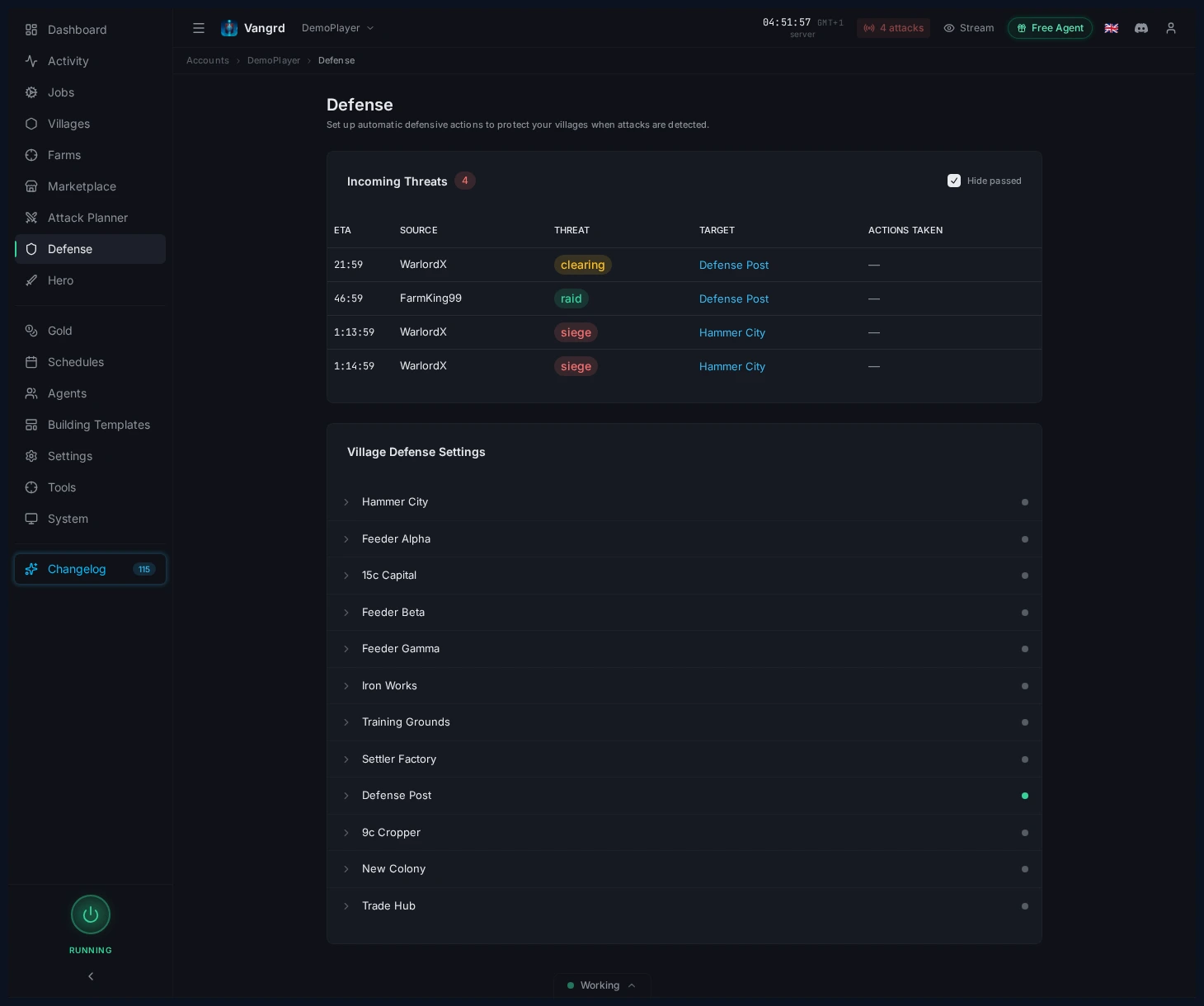
- בדקו במבט מהיר איזה כפר ייפגע הבא.
- בצעו תיעדוף מהטבלה הזו כשכמה כפרים נמצאים תחת איום.
- הרחיבו כפר כדי לשנות את כללי התגובה שלו.
הרחיבו כפר כדי להגדיר תגובות
לכל כפר יש כללי הגנה משלו.
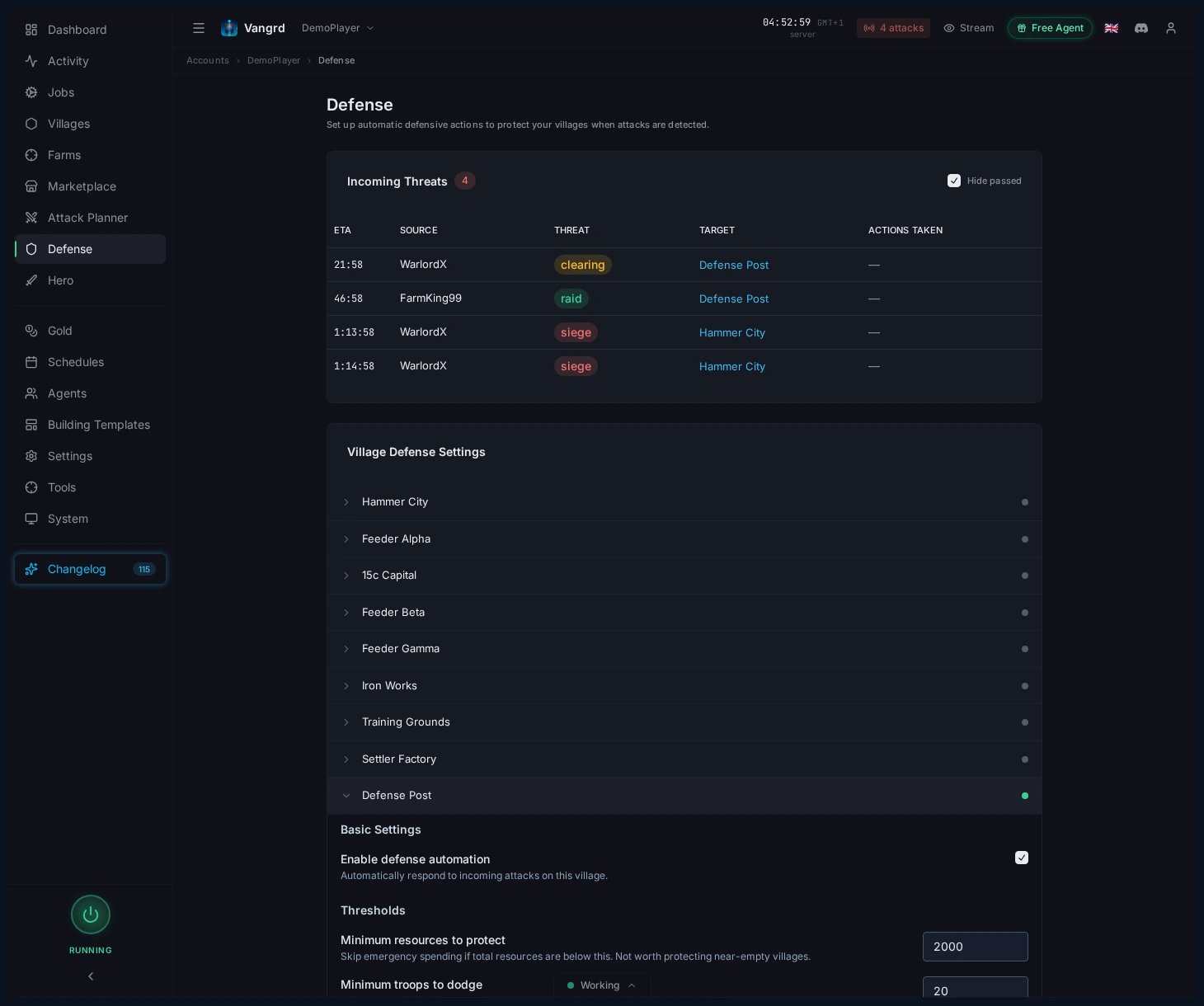
Enable defense automationמפעיל או מכבה אוטומציה עבור הכפר.Minimum resources to protectמדלג על כפרים כמעט ריקים.Minimum troops to dodgeמתעלם מערימות קטנות מדי מכדי שיהיה טעם להזיז אותן.Threat Responsesמפצל התנהגות לפי סוג התקפה.Notificationsשולט מתי התראות נשלחות מחוץ לאפליקציה.
תגובות לפי רמת איום
הגדר תגובה נפרדת ל-Raid, ל-Clearing, ל-Siege ול-Chiefing בכל כפר.
Auto-spend resourcesמאמן חיילים לפי סדר העדיפויות לאימון בכפר.Also start a celebrationמאפשר הוצאה דחופה על חגיגה בבניין העיריה. ההגדרה כבויה כברירת מחדל.Send resourcesשולח משאבים לכפרים שלך שנבחרו, לפי סדר העדיפויות שלך.Dodgeמעביר חיילים לקואורדינטות שבחרת לפני פגיעת ההתקפה.- התחמקות שנשלחת כפשיטה חוזרת לאחר המסע. התחמקות שנשלחת כתגבור נשארת ביעד.
Call reinforcementsמשתמש בחיילים מכפרים שלך שנבחרו ומתכנן הגעה לפני ההתקפה.- הגדר זמני תגובה נפרדים לפעולות משאבים ולפעולות חיילים.
בחר פעולת חיילים לכל רמה. התחמקות ותגבור עונים על צרכים שונים של הכפר. בדוק את היעד וכפרי המקור לפני הפעלת הכלל.
טיפ: התחל בכללים לבירות ולכפרים התקפיים, ואז הגדר את שאר הכפרים.
איך Vangrd מסווג התקפה נכנסת
Vangrd משתמש בארבע רמות איום: פשיטה, ניקוי, מצור וכיבוש. הוא מסווג התקפות לפי דפוס ההגעה הזמין והמידע על פשיטות.
זמן המסע יכול לספק ראיות נוספות על החיילים בהתקפה. כשהוא מוכיח נוכחות של חיילי מצור או צ'יף, Vangrd יכול להעלות את רמת האיום. הערכת החיילים לעולם לא מורידה את רמת האיום. אפשר לשלוט בהתנהגות הזאת בהגדרת העלאת האיום של הכפר.
הסיווג הוא הערכה. זיהוי ותגובה דורשים חיבור פעיל למשחק ומספיק זמן לפני ההתקפה. בדוק את שעת ההגעה והתגובה שהוגדרה כשאתה בוחן התקפה נכנסת.
עקבו אחרי התראת הדשבורד
הדשבורד מציג ספירת התקפות נכנסות לפני שאתם פותחים את ההגנה.
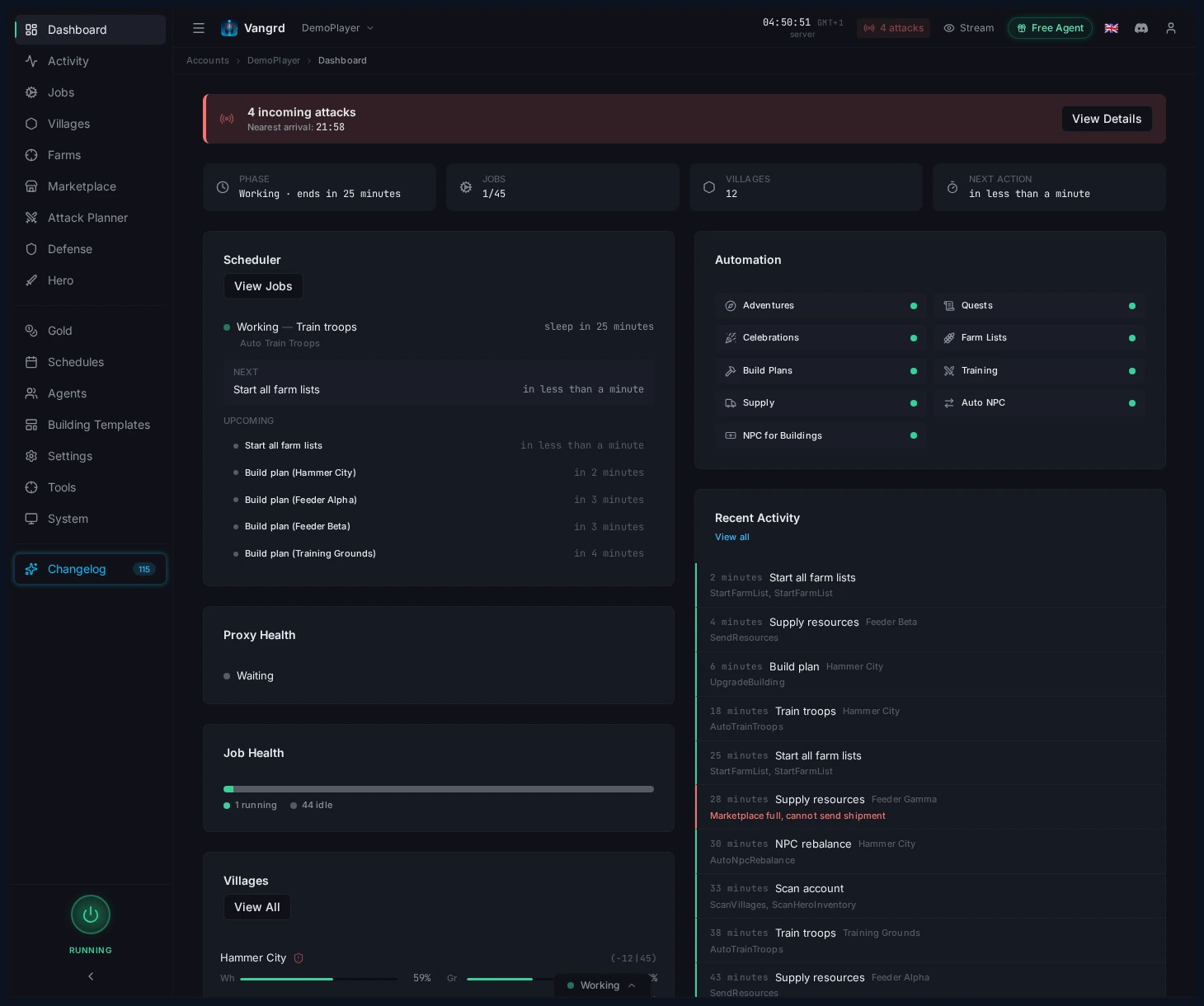
- השתמשו בהתראה כסימן מהיר לכך שמשהו דורש תשומת לב.
- עברו משם להגנה כשהספירה משתנה.
הגדר התראות Discord ו-Telegram
חבר את ערוץ ההתראות של Discord או Telegram בהגדרות החשבון. לאחר מכן בחר אילו איומים על כפרים ישלחו התראה.
- הפעילו התראות רק בכפרים שבהם האיום חשוב.
- העלו את
Minimum threat levelבכפרים בעלי ערך נמוך כדי לצמצם רעש. - הפעילו את
Notify on actionsכשאתם צריכים אישור שהתחמקויות או כללי בזבוז משאבים הופעלו.
כדי לקבל הודעה כאשר בעל ברית מותקף, ראה התראות על התקפות על בעלי ברית.
לכוונון לוחות זמנים סביב בעלות וחלונות פעילות, שלבו זאת עם מדריך לוחות הזמנים והבטיחות. להגדרת חשבון בפעם הראשונה, התחילו עם מתחילים.
שאלות נפוצות
האם Vangrd מתחמק אוטומטית מהתקפות נכנסות?
כן, כאשר אוטומציית ההגנה מופעלת בכפר והאיום הנכנס תואם לתגובה שהוגדרה. אתם שולטים בהתנהגות לפי סוג איום (בזיזה, ניקוי, מצור, צ'יפינג) ויכולים לדלג על כפרים שלא עומדים בספי מינימום של משאבים או חיילים.
האם אפשר להגדיר תגובות שונות לבזיזות לעומת צ'יפים?
כן. לכל כפר יש כללים נפרדים לפי רמת איום, כך שאפשר לשמור על תגובות קלות לבזיזות ולהסלים תגובות לניקוי, מצור וצ'יפינג בכפרים שחשובים לכם.
האם אקבל התראה כשיש התקפה נכנסת?
אם תפעילו התראות בכפר. השתמשו ב-Minimum threat level כדי לסנן התקפות נכנסות בעלות ערך נמוך, והפעילו את Notify on actions כשאתם רוצים אישור שכלל התחמקות או בזבוז משאבים הופעל.
מה כדאי להגדיר קודם בחשבון חדש?
הגנו על בירות ועל האמרים עם כללים אגרסיביים, ואז השאירו פידרים עם תגובות בזיזה בסיסיות. הגדירו Minimum resources to protect כדי שכפרים כמעט ריקים יזכו להתעלמות.
האם Vangrd יכול לבזבז משאבים כדי למנוע אותם מתוקפים?
כן, כתגובה לפי איום. אפשר להקצות פעולות נפרדות לבזבוז משאבים, התחמקות חיילים ושליחת התראות בהתאם לרמת האיום שהכפר חווה.
Vangrd הוא בוט Travian שמפעיל את החשבון בענן (ענן, מסביב לשעון). לפני הבחירה, ראו את השוואת הבוט הטוב ביותר ל-Travian ב-2026.
עוד מדריכים
התראות על התקפות בברית ב-Travian: Telegram ו-Discord
קבלו הודעה ב-Telegram או ב-Discord כשבעל ברית שאתם עוקבים אחריו מותקף או נבזז ב-Travian, ותכננו התקפת נגד בלחיצה אחת עם Vangrd.
חקלאות נאות מדבר ב-Travian: ניקוי, פשיטות וניסיון לגיבור
הגדר חקלאות נאות מדבר ב-Travian: סרוק נאות סמוכים, נקה בעלי חיים בבטחה, תזמן פשיטות לאחר חזרתם והעלה את רמת הגיבור.
הבונה האוטומטי של Travian: אוטומציה לתורי בנייה ושדרוגים
הגדרת תוכניות בנייה לכפרים, ברירות מחדל לחשבון, תבניות לשימוש חוזר והחלת תבניות באוטומציית הבנייה של Vangrd.