Automatický stavitel v Travianu: Automatizujte stavební fronty a vylepšení
Automatický stavitel Vangrd pro Travian postupuje podle stavebního plánu každé vesnice. Nastavte cílové úrovně a společné výchozí hodnoty. Pro odlišné chování použijte vlastní nastavení vesnice.
Stavební plány jsou ve Village Development
Spravujte stavební frontu každé vesnice pod Villages > Development.
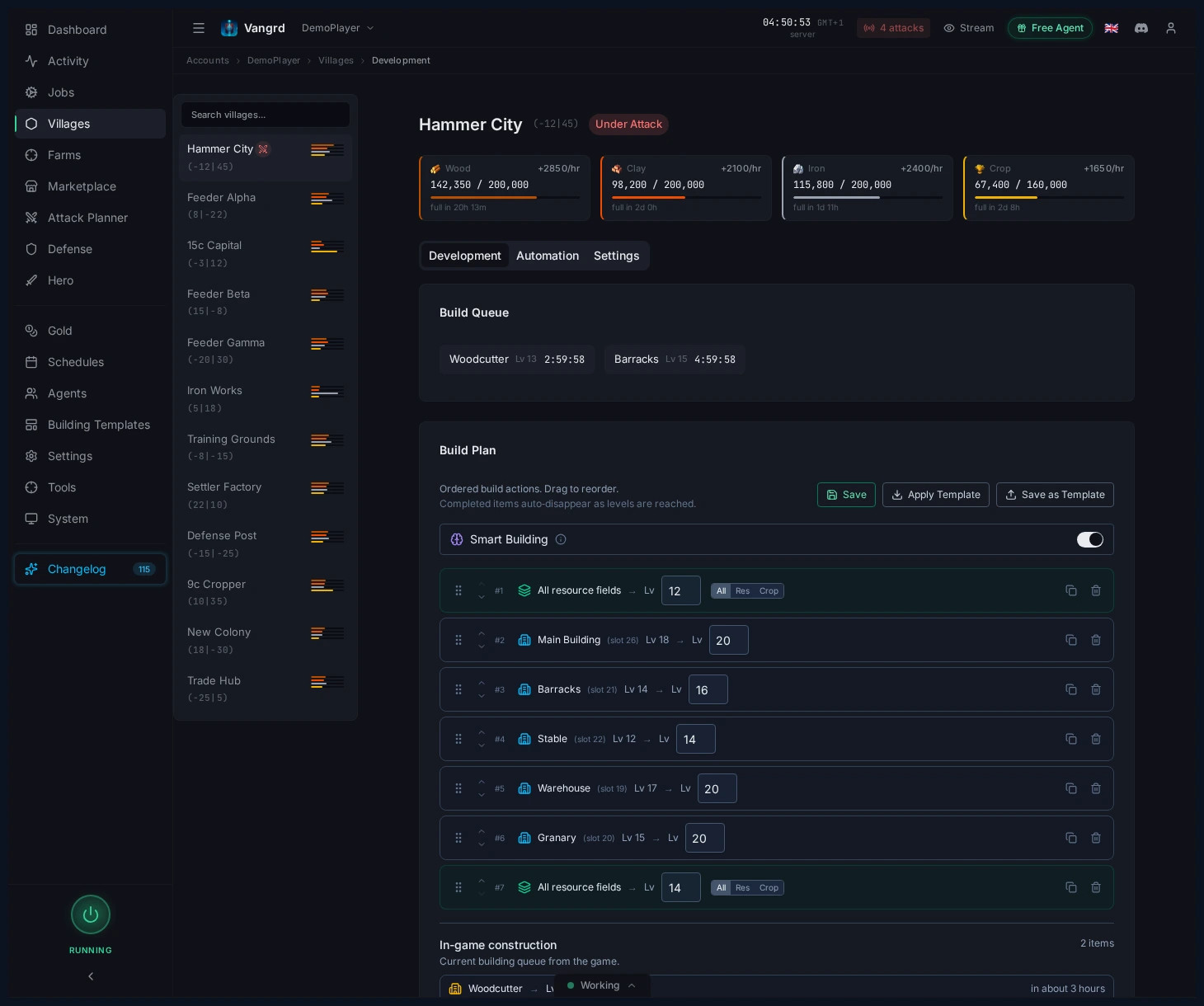
Build Planje seřazený seznam, kterým Vangrd pro danou vesnici prochází.Demolish Planje samostatný seznam pro bourací úlohy.- Položky můžete přímo v plánu vesnice přesouvat, duplikovat a odebírat.
Potřebné budovy umístěte před nové stavby, které je vyžadují. Pokud záleží na přesném pořadí, použijte samostatné položky plánu. Pro plošný rozvoj polí použijte cíl polí místo opakování každého místa. Před změnou cílů zkontrolujte aktuální frontu, protože Vangrd zohledňuje probíhající vylepšení.
Používejte mapu vesnice k umisťování cílů
Klikáním na sloty v mapě vesnice rychle založíte nebo upravíte plán.
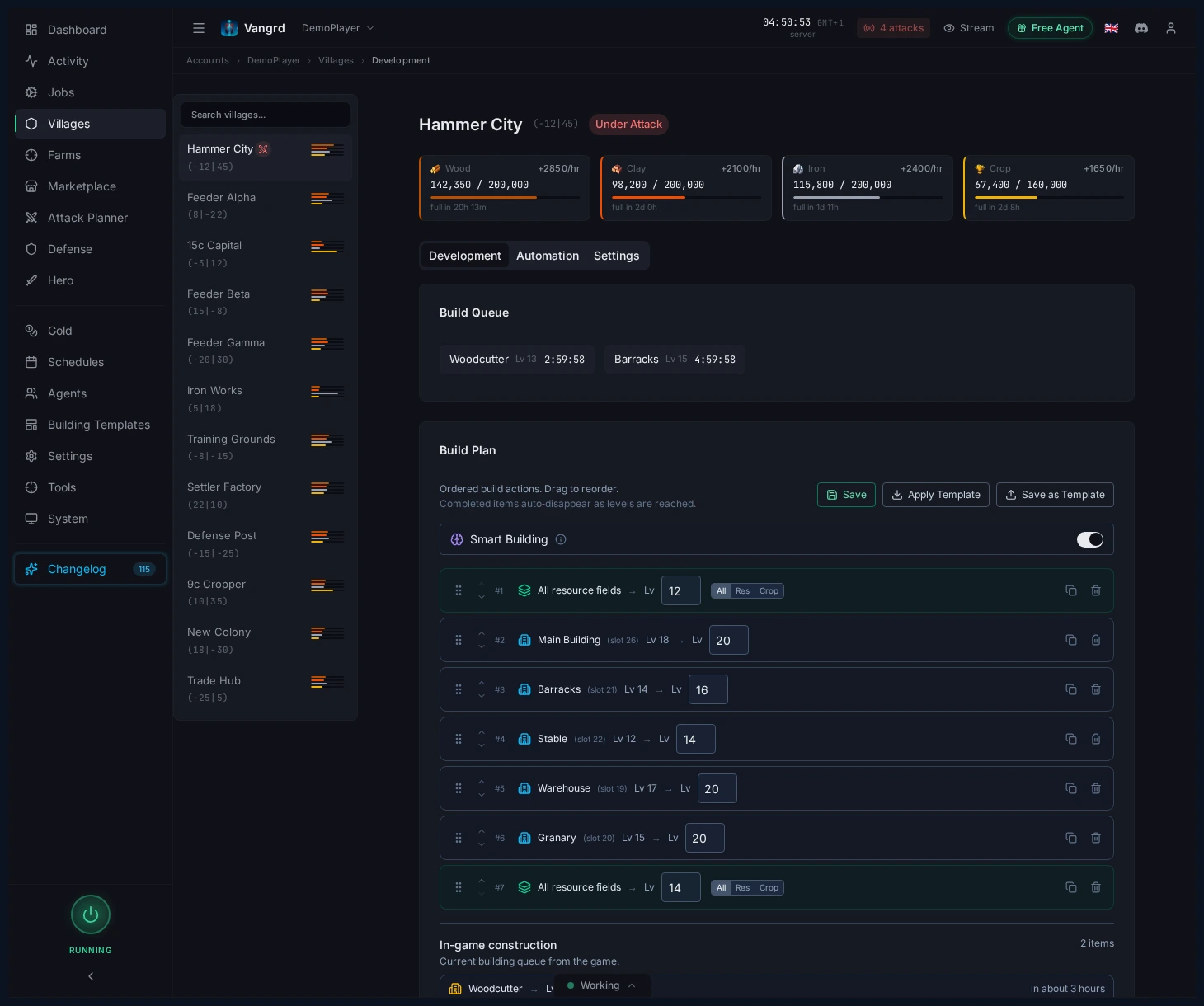
- Při tvarování nové vesnice přidávejte konkrétní budovy z mapy.
- Používejte cíle polí pro obecný postup surovinových polí, aniž byste museli vypisovat každý slot.
- Před uložením šablony zkontrolujte zařazené cíle proti živému rozvržení.
Tip: Mějte jeden čistý startovní plán pro každý typ vesnice a kopírujte ho místo toho, abyste ho pokaždé stavěli od nuly.
Jak automatický stavitel vybírá další vylepšení
Vangrd porovná plán s budovami, surovinami, kapacitou skladů a volnými místy ve frontě vesnice. Položka, která už splňuje cíl, další vylepšení nepotřebuje.
Kontrola předpokladů a surovin
Před novou stavbou Vangrd ověří, zda potřebné budovy dosáhly požadovaných úrovní. Rozestavěná budova se nepočítá jako splněný předpoklad. Potřebná vylepšení umístěte dříve v plánu, aby se další stavba mohla zpřístupnit.
Smart Building umožňuje pokračovat připravenou položkou, zatímco jiná čeká. Například pole se může vylepšovat, zatímco dražší budova čeká na suroviny. Před zahájením Vangrd stále kontroluje cenu vybrané položky a místo ve frontě. Pokud všechny položky potřebují více surovin, plán čeká, dokud nebude možné některé vylepšení zaplatit.
Odstranění blokace kapacitou skladu
Blokace znamená, že vylepšení stojí více některé suroviny, než vesnice dokáže uložit. Dřevo, hlína a železo využívají Sklad surovin. Obilí využívá Sýpku.
Při zapnutém Auto-upgrade storage Vangrd vybere vylepšení skladu před blokovanou stavbou. Kontroluje stávající skladovací budovy i dostupné nové stavby. Volba závisí na chybějící kapacitě, ceně vylepšení a dostupných surovinách. Po rozšíření skladu může Vangrd pokračovat v původním plánu, jakmile se náklady vejdou do kapacity.
Plný Sklad surovin sám o sobě neznamená, že stavba potřebuje větší kapacitu. Před přidáním skladu do šablony ověřte, zda plánovaná cena převyšuje kapacitu. Suroviny hrdiny tuto blokaci neřeší, protože vesnice stále potřebuje místo na požadované suroviny.
Použití správné stavební fronty
Římané mají oddělené fronty pro surovinová pole a budovy ve vesnici. Vangrd kontroluje frontu vybraného vylepšení i celkový limit. Obsazená fronta budov může stále umožnit vylepšení pole. Ostatní národy sdílejí dostupná místa ve frontě mezi poli a budovami. Toto chování určuje národ vesnice. Římskou frontu nemusíte zapínat zvláštním přepínačem.
Nastavte výchozí hodnoty účtu na Build Plans
Nakonfigurujte sdílené chování výstavby na stránce Build Plans.
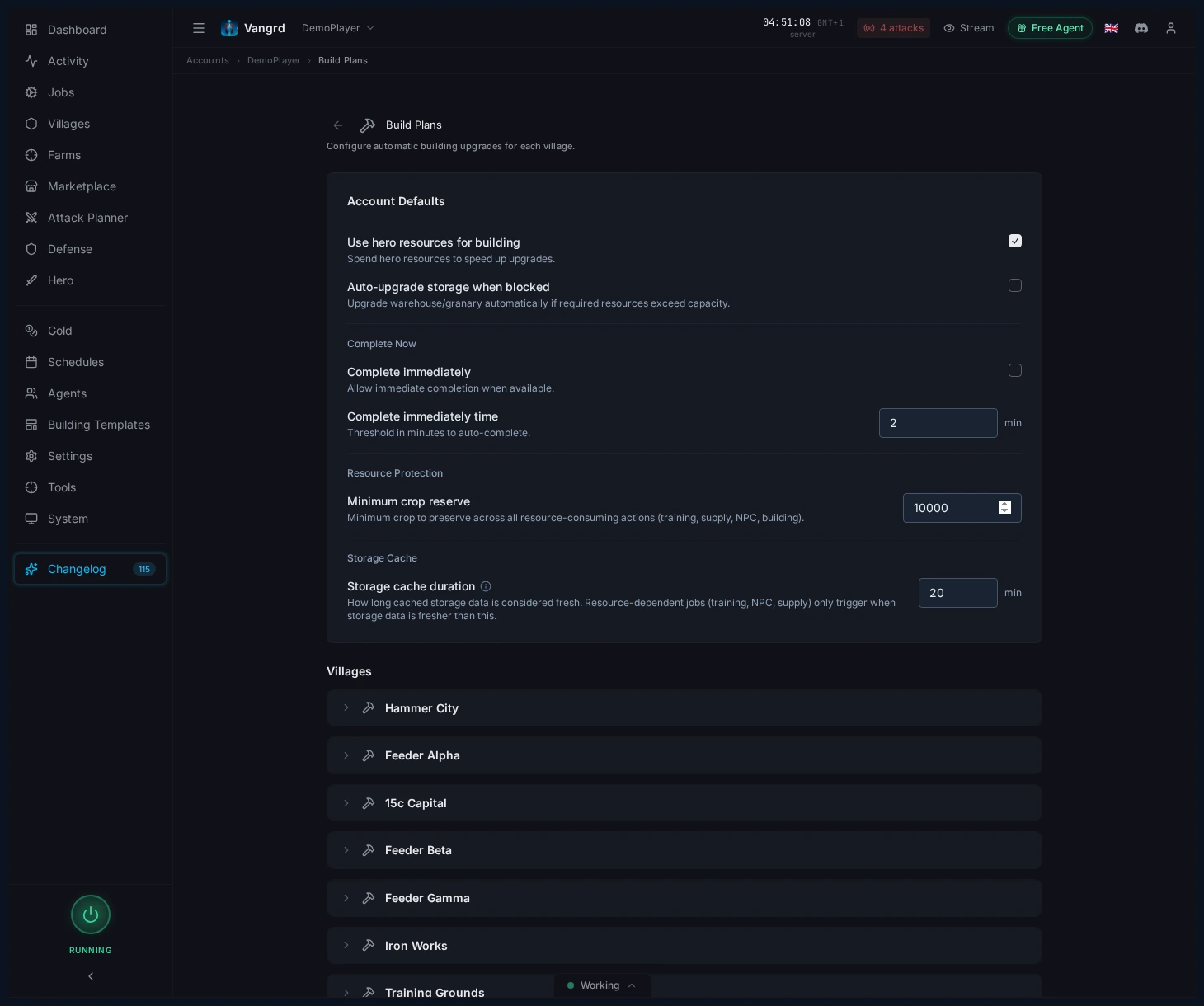
Smart Buildingnechá pokračovat levnější připravené položky, zatímco drahá vylepšení čekají.Use hero resourcesčerpá pro stavební úlohy ze zásob hrdiny.Special upgradezapíná dodatečnou cestu vylepšení, když je podporovaná.Auto-upgrade storagebrání tomu, aby se fronty zasekly na limitech skladu nebo sýpky.Complete immediatelyurčuje, kdy může zlato dokončit dlouhá vylepšení.Minimum crop reservechrání obilí potřebné pro údržbu.
Než použijete stejná stavební pravidla ve více vesnicích, nastavte výchozí hodnoty. Vesnice může přepsat jednotlivé hodnoty a ponechat ostatní výchozí nastavení účtu. Vraťte se k výchozí hodnotě, pokud má vesnice sledovat pozdější změny účtu. Před povolením výdajů na stavby zkontrolujte obilní rezervy vesnic s jednotkami.
Spravujte opakovaně použitelné šablony
Ukládejte si úvodní plány a archetypy vesnic na kartě Building stránky Templates.
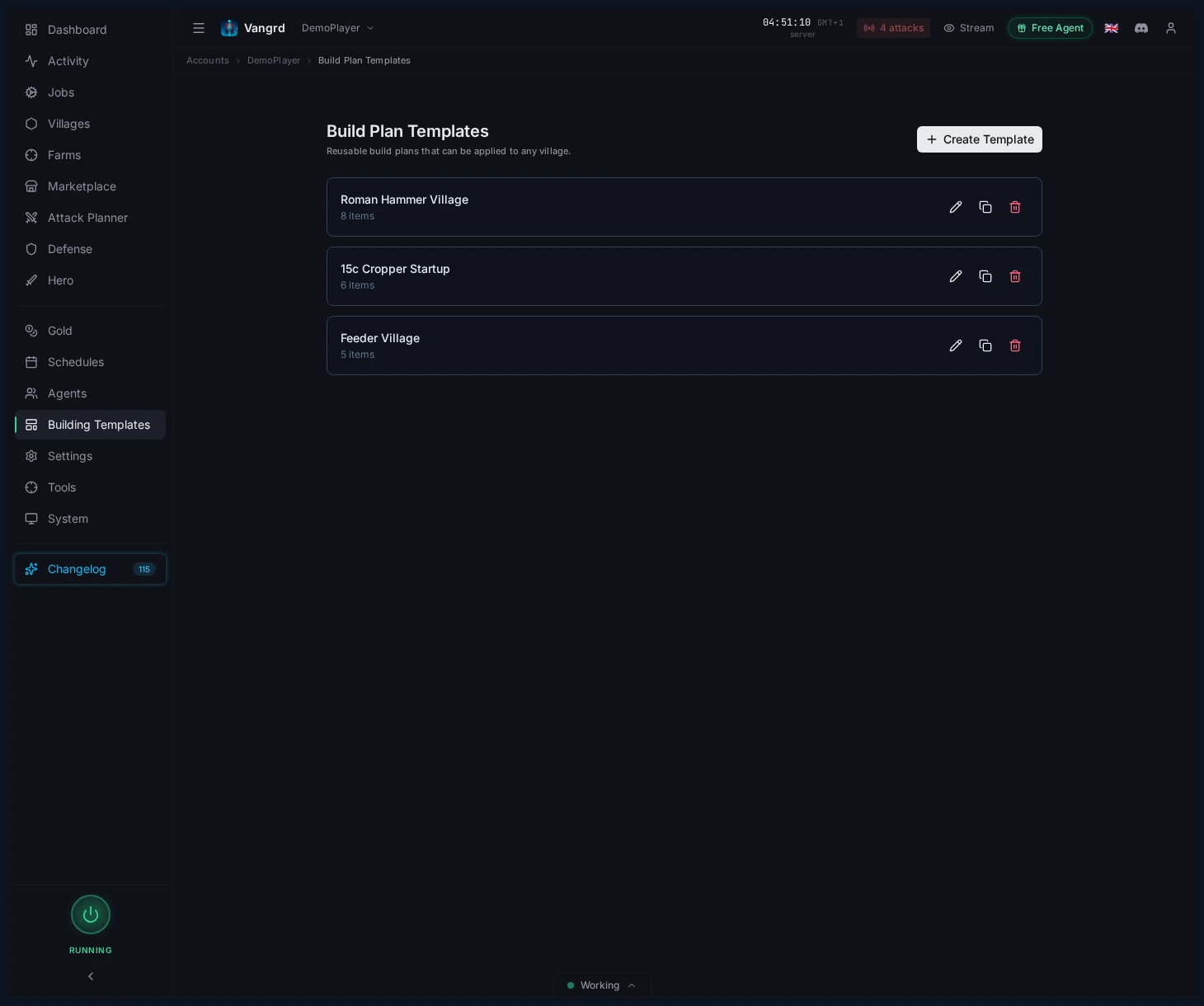
- Vytvářejte šablony od nuly nebo z existující vesnice.
- Mějte samostatné šablony pro hlavní vesnice, podpůrné vesnice, útočné vesnice a osadníky.
- Duplikujte a upravujte varianty pro drobné rozdíly mezi typy vesnic.
Stavební plány ve více vesnicích
Pro společné chování použijte výchozí nastavení účtu a pro každou vesnici samostatný plán. Cíle hlavní a zásobovací vesnice tak zůstanou oddělené, ale obě používají stejná stavební nastavení.
- Nastavte společné chování v
Build Plans. - Na kartě
BuildingvTemplatesuložte šablony pro hlavní vesnice, zásobovací vesnice, útočné armády a osadníky. - Před použitím vhodné šablony zkontrolujte národ a aktuální uspořádání každé vesnice.
- Přepište nastavení vesnice, pokud potřebuje jinou rezervu obilí nebo pravidla pro zlato.
- Po použití šablony zkontrolujte plán a aktuální frontu každé vesnice.
V útočné vesnici ponechte dost obilí pro výživu jednotek, než zaplatíte další stavbu. V zásobovací vesnici použijte cíle polí odpovídající surovinám, které má dodávat. Budovy pro zakládání vesnic držte v šabloně osadníků, odděleně od plánu hlavní vesnice. Šablony kopírují položky do plánu vesnice. Při pozdější změně uložené šablony zkontrolujte cílový plán.
Nové vesnice mohou používat workflow pro rozjezd nové vesnice. Workflow při založení vesnice použije vybraný plán a nastaví zásobovací trasu. Před aktivací workflow vyberte stavební šablonu a dárcovskou vesnici. Po založení zkontrolujte historii běhů a ověřte provedení akcí.
Nastavte zásobovací trasy mezi vesnicemi pro financování nové vesnice od dárců. Stavební plán určuje cíle vylepšení. Zásobovací trasa dodává suroviny potřebné k jejich dosažení. Zkontrolujte rezervy dárců, aby nová vesnice neodebrala suroviny potřebné jinde.
Upravujte a používejte šablony
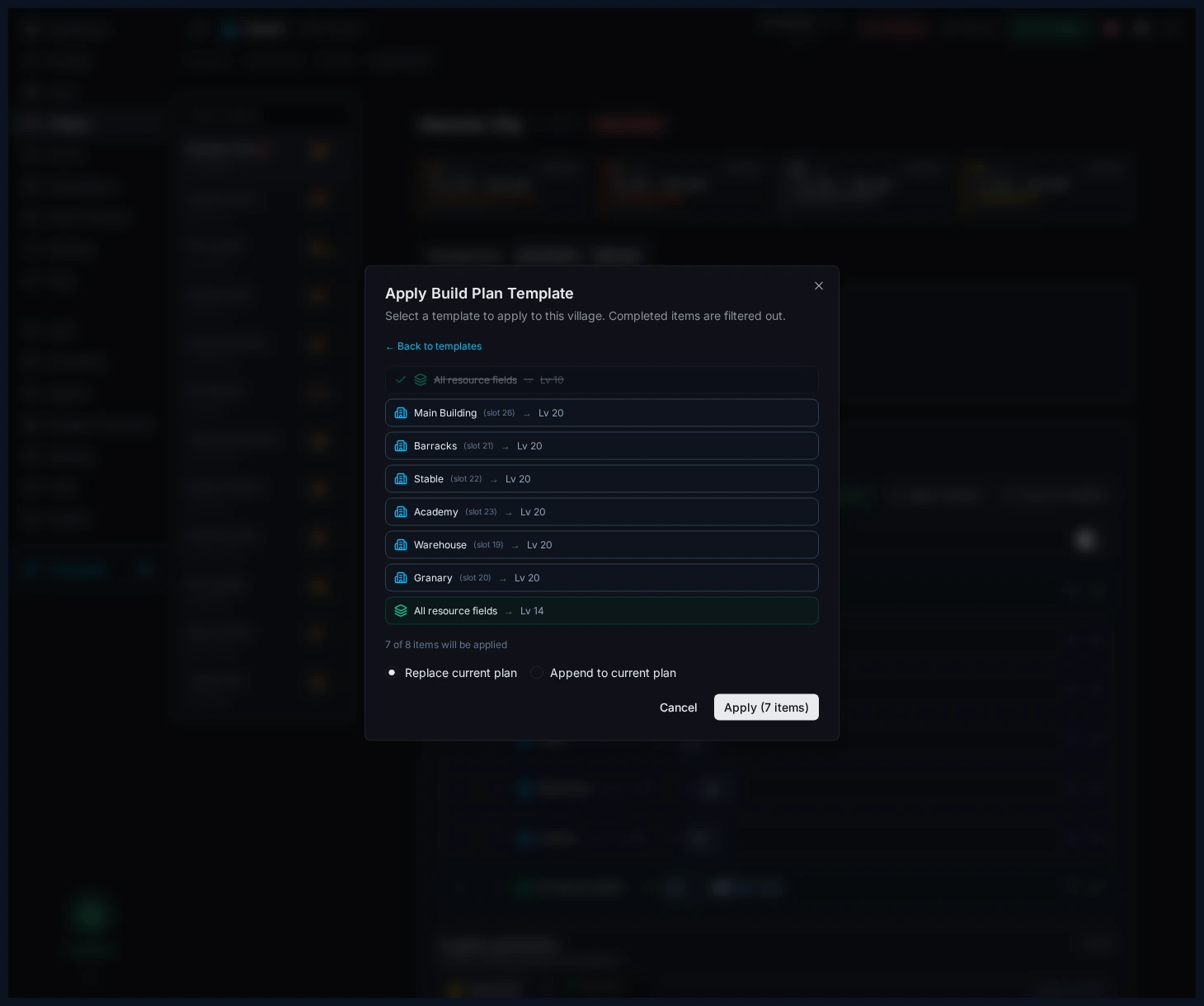
Upravujte šablony přes mapové UI a pak je posílejte do plánů vesnic přes dialog s náhledem.
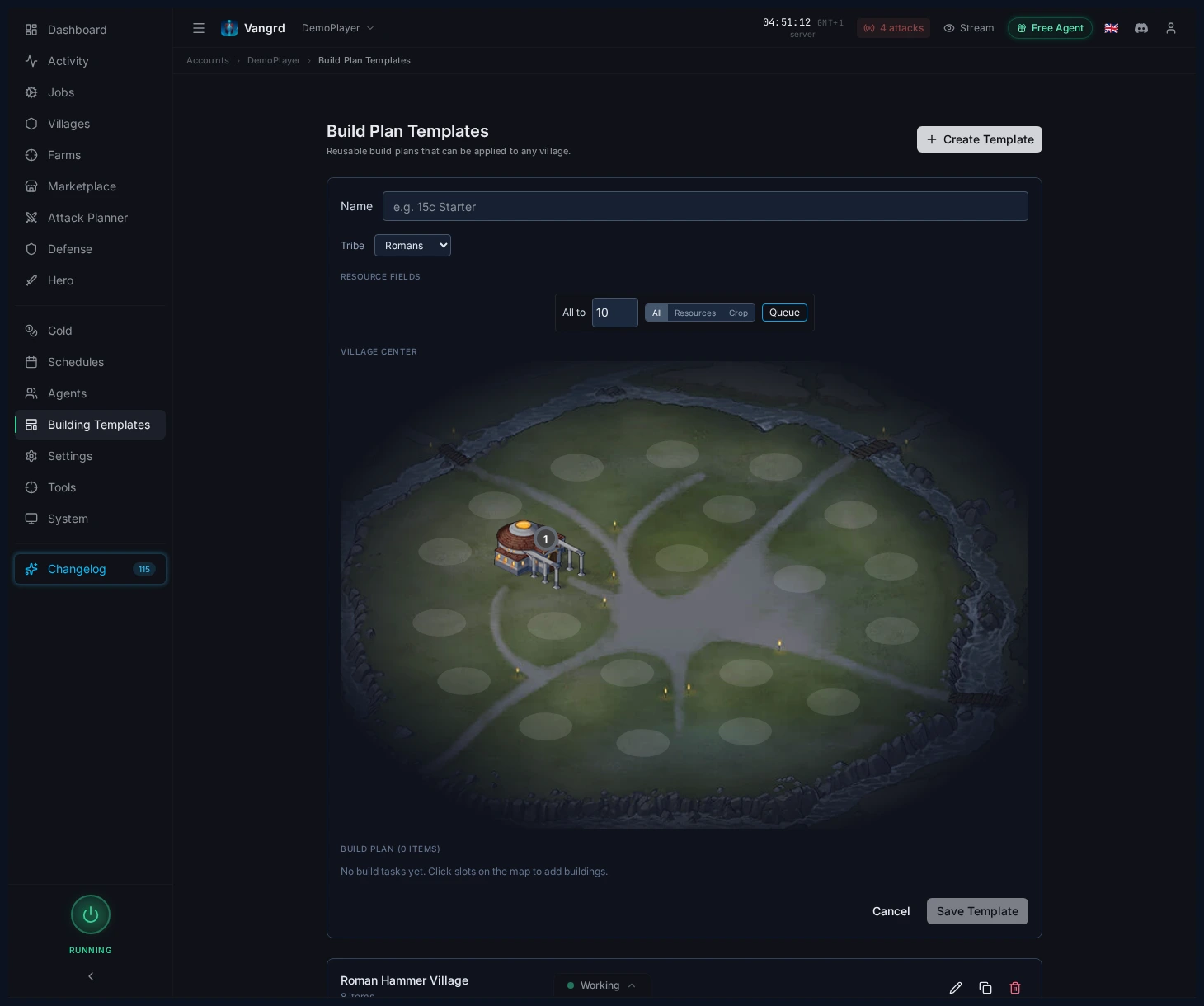
- Než rozložíte budovy, vyberte národ.
- Pomocí hromadných akcí polí rychle nastavte základní cílovou úroveň.
Apply Templatezobrazí náhled výsledku a umožní vámReplaceneboAppendcílový plán.
Dokončení vylepšení zlatem
Zapněte Complete immediately, pokud má Vangrd utrácet zlato za dokončení vhodných vylepšení. Pomocí Complete immediately time v minutách nastavte práh automatického dokončení. Použijte výchozí hodnotu účtu nebo ji přepište v jednotlivé vesnici.
- Před zapnutím automatického dokončení zkontrolujte časový práh.
- Ve vesnicích, kde mají vylepšení skončit normálně, ponechte nastavení vypnuté.
- Pokud plán potřebuje jiná pravidla dokončení, použijte vlastní nastavení vesnice.
Nastavení neumožní okamžitě dokončit každou stavbu. Vangrd před pokusem o dokončení kontroluje dostupnost herní možnosti. Dokončení zlatem nedodá chybějící suroviny ani potřebné budovy pro další položku plánu. Pokud plán po dokončení stále čeká, zkontrolujte tyto požadavky.
Pro podporu ekonomiky vesnice to propojte s průvodcem Resource Supply. Pro první nastavení začněte s Getting Started.
Časté dotazy
Umí Vangrd dokončit vylepšení okamžitě za zlato?
Ano, když na stránce Build Plans zapnete Complete immediately. Sami určíte podmínky, za kterých je možné použít zlato k dokončení dlouhých vylepšení, takže se spustí jen tam, kde na tom opravdu záleží.
Co dělá Smart Building?
Smart Building nechá pokračovat levnější připravené položky v plánu, zatímco drahá vylepšení čekají na suroviny. Díky tomu se fronty hýbou dál místo toho, aby se zasekly na jedné velké položce.
Musím plán každé vesnice stavět od nuly?
Ne. Uložte si úvodní plány a archetypy na kartě Building stránky Templates a pak je použijte na vesnice přes dialog s náhledem, který vám dovolí Replace nebo Append existující plán. Římané, Germáni a Galové mají každý vlastní rozvržení.
Zasekne se fronta, když je sklad plný?
Ne, pokud je zapnuté Auto-upgrade storage. Vangrd automaticky vylepšuje sklad a sýpku, aby se fronty nezasekly na limitech kapacity.
Umí Vangrd používat suroviny mého hrdiny pro stavby?
Ano. Zapněte Use hero resources ve výchozích hodnotách Build Plans pro celý účet a Vangrd bude čerpat ze zásob hrdiny, když stavební úloze chybí suroviny.
Jak ochráním obilí pro údržbu jednotek?
Nastavte Minimum crop reserve na stránce Build Plans. Vangrd tuto hodnotu bere jako nedotknutelnou při vyhodnocování, jestli má stavební úloha dost surovin.
Vangrd je Travian bot, který provozuje tvůj účet v cloudu (cloud, nepřetržitě). Než si vybereš, podívej se na srovnání nejlepších Travian botů 2026.
Další průvodci
Farmení oáz v Travianu: čištění, loupeže a zkušenosti hrdiny
Nastavte farmení oáz v Travianu: vyhledejte okolní oázy, bezpečně odstraňte zvířata, naplánujte loupeže po jejich návratu a zvyšujte úroveň hrdiny.
Obranný bot Travian: automatické uhýbání, posily a upozornění na útoky
Nastavte obranu Travianu podle vesnice a hrozby: automatické uhýbání, posily, utrácení či odesílání surovin a upozornění Discord nebo Telegram.
Farmovací bot Travian: automatizujte farm listy a loupeže
Spouštějte farm listy Travianu s náhodným zpožděním, nastavením jednotlivých seznamů, řešením ztrát po fatálních hlášeních a laděním výnosu. Nastavte farmovacího bota Vangrd.