Plánovač útoků v Travianu: Naplánujte koordinované útoky ve více vlnách
Pro rozdělení úkolů v operacích mezi členy si přečtěte plánování operací aliance.
Sestavte plán ze zdroje, cíle a časování
Nastavte zdroj, cíl, časování a jednotky v jednom formuláři.
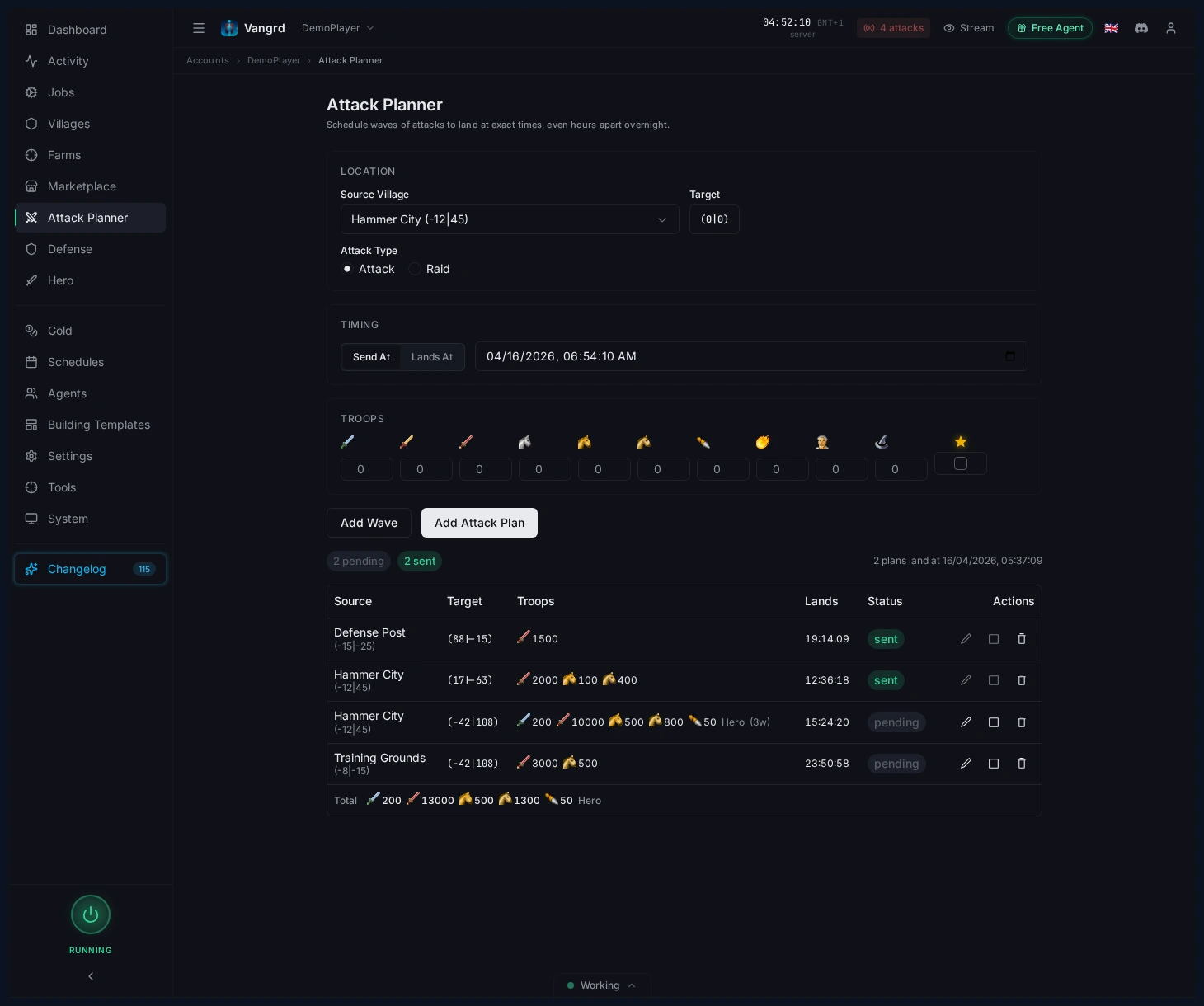
- Vyberte svou
Source Village. - Nastavte souřadnice cíle pomocí výběru souřadnic.
- Před přidáním vln zvolte
Attack Type. - Použijte
Send Atpro pevný čas odeslání neboLands Atpro koordinované příchody. - Před uložením zkontrolujte náhled cesty.
Zařaďte více vln do fronty
Navrstvěte vlny s různým složením jednotek na jeden cíl.
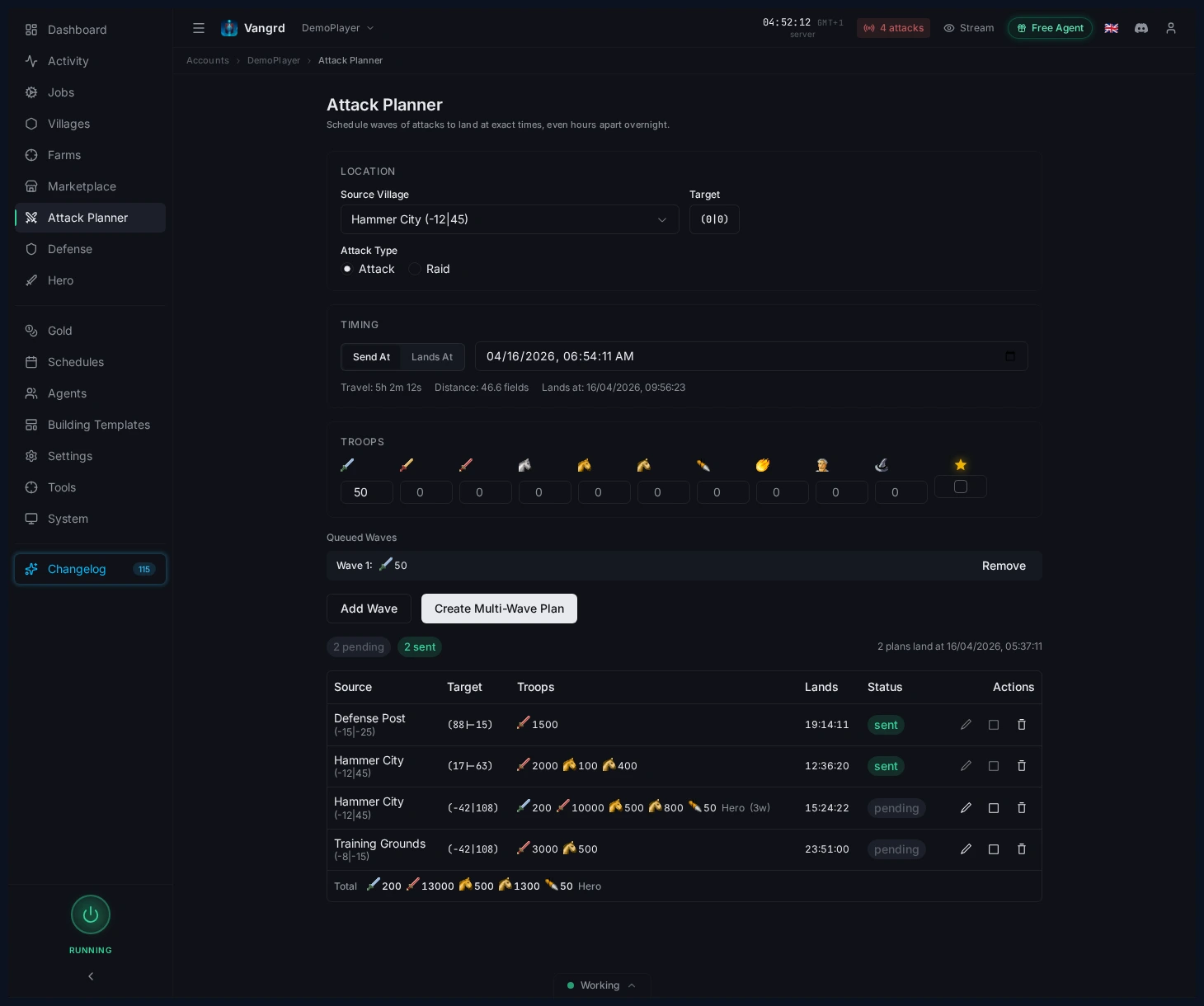
- Zadejte počty jednotek a potom klikněte na
Add Wave. - Hrdinu přiřaďte pouze k jedné vlně.
- V případě potřeby přidejte cíle katapultů nebo detaily průzkumu.
- Až bude fronta vypadat správně, klikněte na
Create Multi-Wave Plan.
Tip: Použijte
Lands At, když musí vlny z několika vesnic dorazit společně.
Zkontrolujte čekající plány v tabulce
Uložené plány zůstávají v tabulce plánovače viditelné až do provedení.
- Před oknem odeslání zkontrolujte
Source,Target,Troops,LandsaStatus. - Rozbalte řádek a zkontrolujte jednotlivé vlny.
- Upravujte, přerušujte nebo mažte plány přímo z tabulky.
Používejte plánovač ke koordinaci, ne k odhadování
Nechte plánovač vyřešit výpočty časování, abyste se mohli soustředit na strategii.
- Připravte každou zdrojovou vesnici zvlášť.
- Použijte
Lands Atk synchronizaci časů příchodu. - Po uložení potvrďte tabulku seskupeného plánu.
- Proveďte odeslání bez ručního zásahu v čase odeslání.
Pro ochranu na přijímací straně použijte průvodce Automatizovanou obranou. Pro průzkum a tlak nájezdy kolem stejných cílů se podívejte na Automatizaci farm listu.
Časté dotazy
Jaký je rozdíl mezi Send At a Lands At?
Send At pevně nastaví čas odeslání a Vangrd vypočítá příchod podle náhledu cesty. Lands At pevně nastaví čas dopadu a Vangrd vypočítá, kdy vlnu odeslat, aby dorazila přesně ve vámi zadaný okamžik.
Může Vangrd koordinovat vlny z více zdrojových vesnic?
Ano. Připravte každou zdrojovou vesnici zvlášť a u každé vlny použijte Lands At, aby se příchody srovnaly. Plánovač vyřeší výpočty časování; vy jen před oknem odeslání potvrdíte seskupený plán.
Jak navrstvím více vln na stejný cíl?
Zadejte počty jednotek pro první vlnu, klikněte na Add Wave a pak upravte složení další vlny. Hrdinu přiřaďte pouze k jedné vlně a až bude fronta vypadat správně, klikněte na Create Multi-Wave Plan.
Můžu uložený plán útoku upravit nebo zrušit?
Ano. Uložené plány zůstávají v tabulce plánovače, dokud nejsou provedeny. Rozbalte řádek, zkontrolujte jednotlivé vlny a plán před oknem odeslání upravte, přerušte nebo smažte přímo z tabulky.
Odesílá plánovač útoky sám?
Ano, po uložení. Plánovač odpálí každou vlnu v jejím vypočteném čase odeslání, takže nemusíte sedět u klávesnice, ale plán a souřadnice cíle si předem stále zkontrolujete.
Vangrd je Travian bot, který provozuje tvůj účet v cloudu (cloud, nepřetržitě). Než si vybereš, podívej se na srovnání nejlepších Travian botů 2026.
Další průvodci
Farmení oáz v Travianu: čištění, loupeže a zkušenosti hrdiny
Nastavte farmení oáz v Travianu: vyhledejte okolní oázy, bezpečně odstraňte zvířata, naplánujte loupeže po jejich návratu a zvyšujte úroveň hrdiny.
Obranný bot Travian: automatické uhýbání, posily a upozornění na útoky
Nastavte obranu Travianu podle vesnice a hrozby: automatické uhýbání, posily, utrácení či odesílání surovin a upozornění Discord nebo Telegram.
Automatický stavitel v Travianu: Automatizujte stavební fronty a vylepšení
Nastavte ve Vangrdu stavební plány vesnic, výchozí hodnoty účtu, opakovaně použitelné šablony a jejich použití.